This article is mainly “compiled” from Chapter 40 of the book Operating Systems: Three Easy Pieces, a very accessible and insightful book recommended to anyone feeling lost about operating systems. This filesystem is based on a very small disk space, using data structures and read/write workflows as the main thread to derive each basic component from scratch, helping you quickly build an intuition for filesystems.
Filesystems are basically built on top of block storage. Of course, some modern distributed filesystems, such as JuiceFS, are based on object storage underneath. But whether block storage or object storage, the essence is addressing and data exchange in terms of “data blocks”.
We will first examine the data structure of a complete filesystem on disk, i.e., its layout; then we will connect the various sub-modules through open/close and read/write workflows, thereby covering the key points of a filesystem.
Author: Muniao’s Miscellany https://www.qtmuniao.com/2024/02/28/mini-filesystem Please indicate the source when reposting.
This article comes from my large-scale data systems column System Thinking, focusing on storage, databases, distributed systems, AI Infra, and computer fundamentals. Welcome to subscribe and support to unlock more articles. Your support is my greatest motivation.
海报.png

Overall Layout
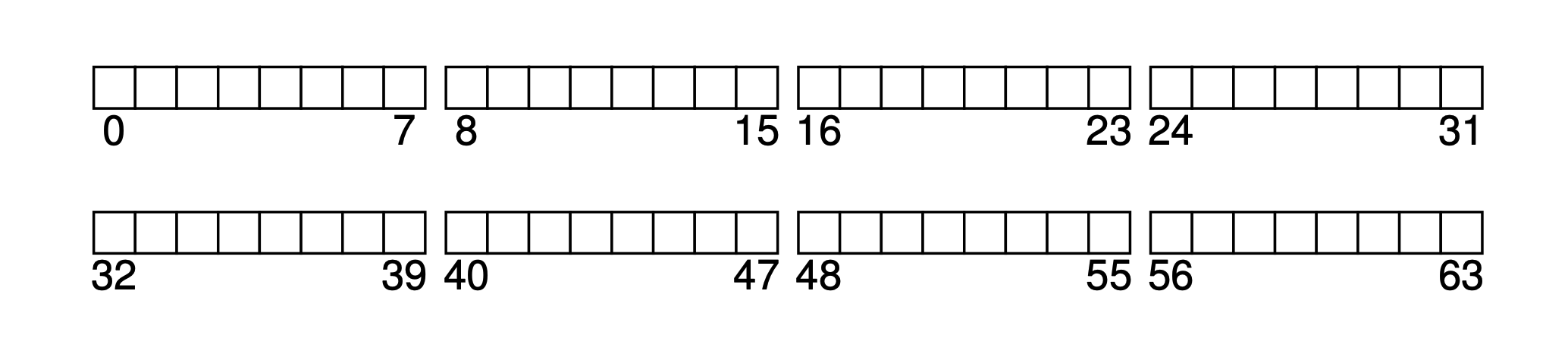
Assume our block size is 4KB, and we have a very small disk with only 64 blocks (so the total size is 64 * 4KB = 256KB), and this disk is dedicated to the filesystem. Since the disk is addressed by blocks, the address space is 0~63.
 filesystem-empty.png
Based on this mini disk, let’s gradually derive this minimal filesystem together.
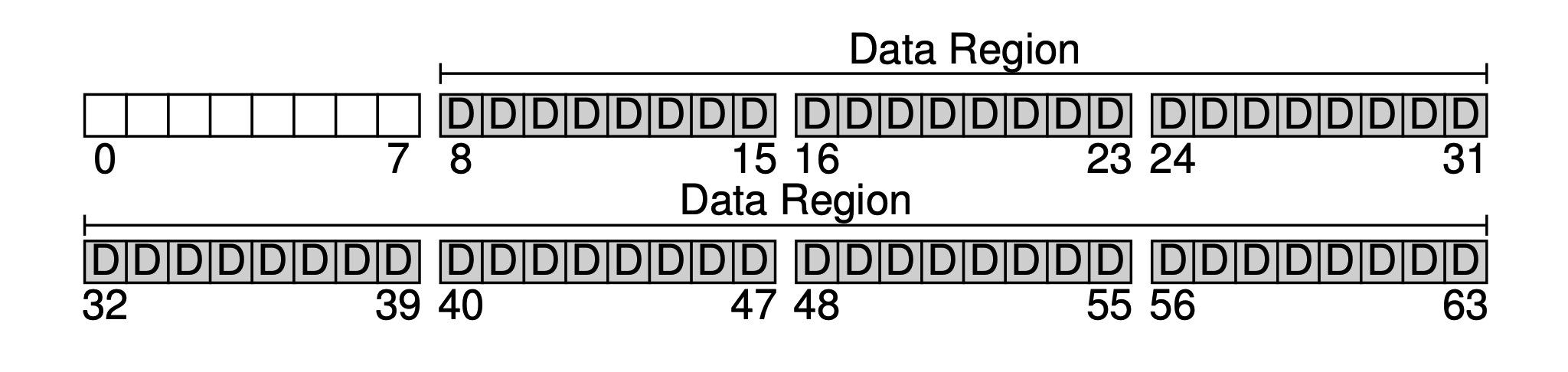
The primary purpose of a filesystem is definitely to store user data. For this, we reserve a Data Region on the disk. Let’s assume we use the last 56 blocks as the data region. Why 56? As we will see later, it can actually be calculated — we can roughly figure out the ratio of metadata to real data, and then determine the sizes of both parts.
 filesystem-data-region.png
Next, we need to save some metadata for each file in the system, such as:
- Filename
- File size
- File owner
- Access permissions
- Creation and modification times
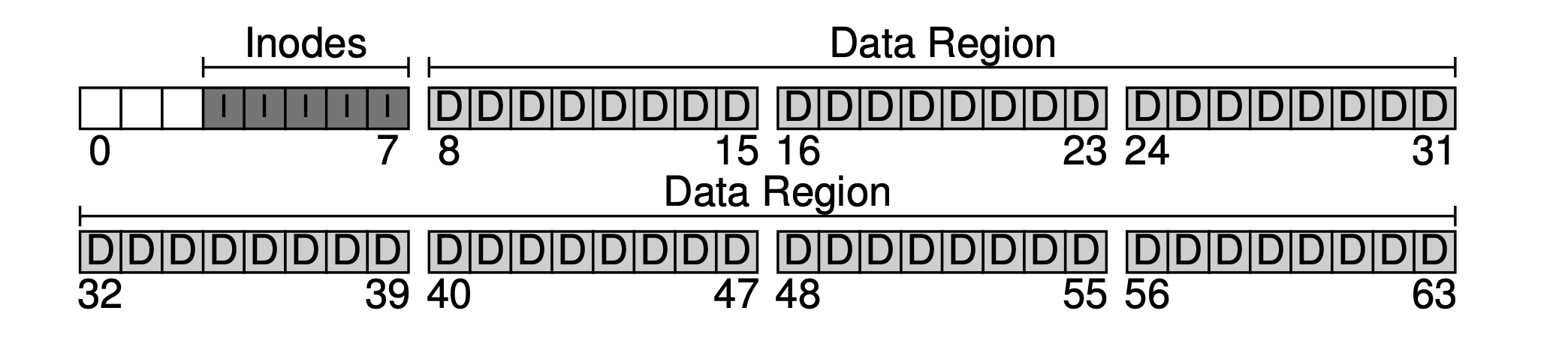
And so on. The data blocks that store this metadata are usually called inodes (index nodes). As shown below, we allocate 5 blocks for inodes.
 filesystem-inodes.png
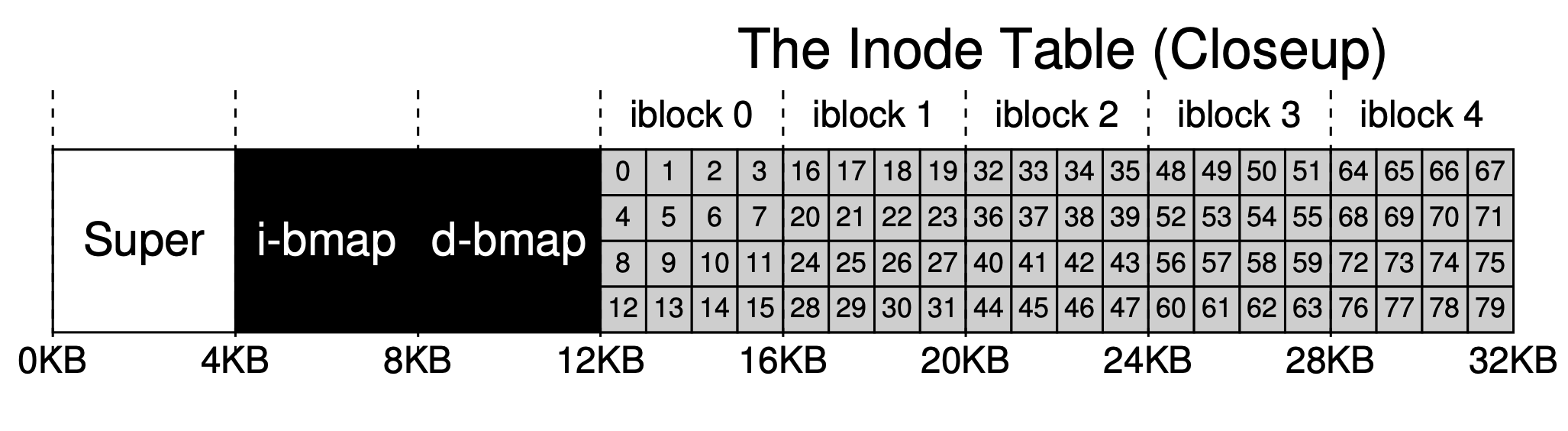
Metadata takes up relatively little space, such as 128B or 256B; here we assume each inode occupies 256B. Thus each 4KB block can hold 16 inodes, so our filesystem can support at most 5 * 16 = 80 inodes, meaning our mini filesystem can support at most 80 files. However, since directories also occupy inodes, the actual number of available files is less than 80.
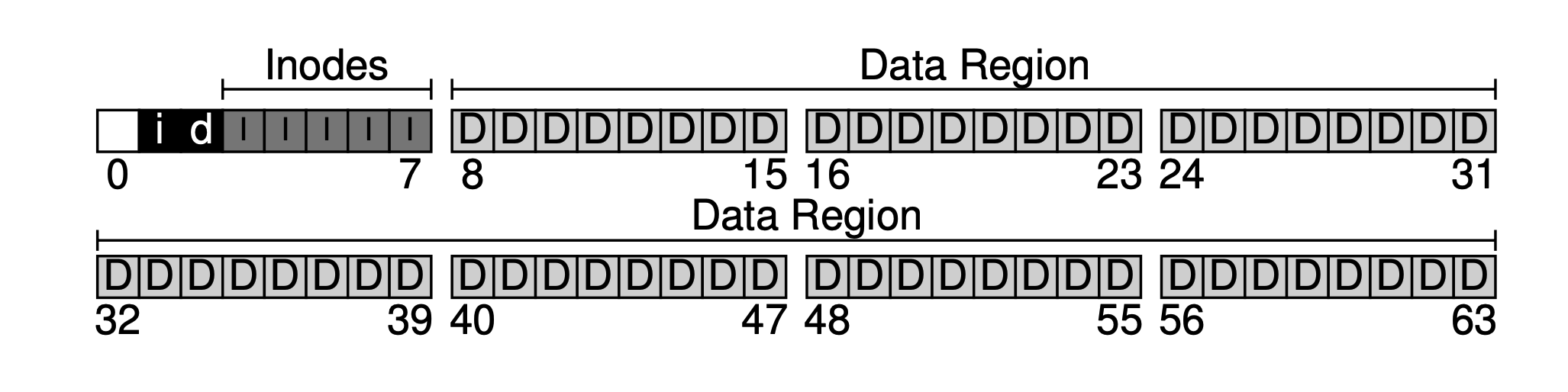
Now that we have the data region and the file metadata region, in a normally used filesystem we still need to track which data blocks are used and which are not. This kind of data structure is called allocation structures. Common industry methods include the free list, which chains all free blocks together as a linked list. But for simplicity, here we use an even simpler data structure: a bitmap. One for the data region, called the data bitmap; one for the inode table, called the inode bitmap.
The idea of a bitmap is simple: use one bit for each inode or data block to mark whether it is free: 0 means free, 1 means occupied. A 4KB bitmap can track at most 32K objects. For convenience, we allocate one full block each for the inode table and the data pool (although it won’t be fully used), leading to the figure below.
 filesystem-bitmap.png
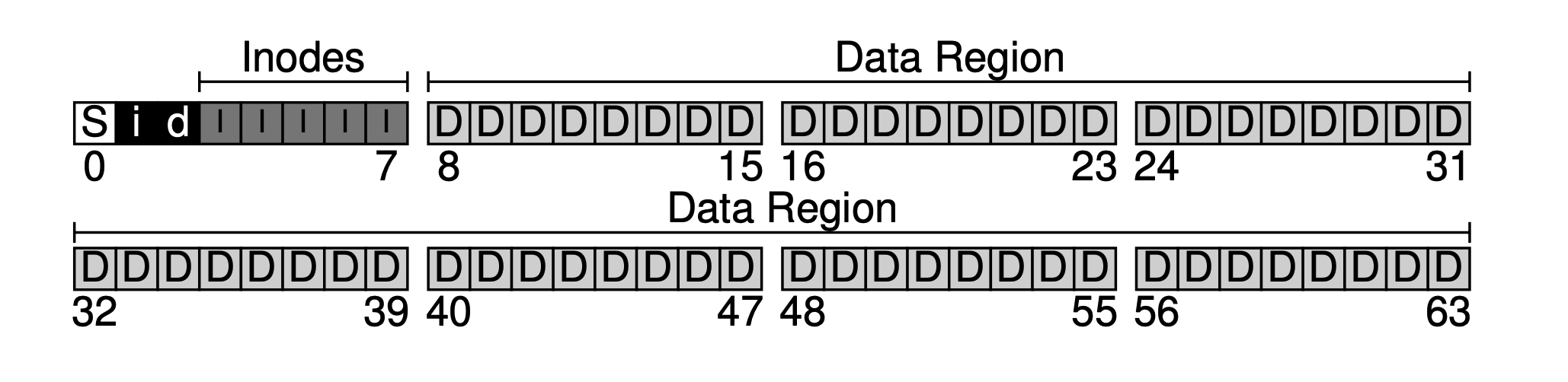
As can be seen, our basic idea is to lay out data from back to front, with one block remaining at the end. This block is intentionally left to serve as the filesystem’s superblock. The superblock acts as the entry point of a filesystem, usually storing some filesystem-level metadata, such as how many inodes and data blocks this filesystem has (80 and 56), the starting block offset of the inode table (3), and so on.
 filesystem-superblock.png
Thus when the filesystem is mounted, the operating system first reads the superblock (hence it is placed at the front), initializes a series of parameters based on it, and mounts it as a volume into the filesystem tree. With this basic information, when files in this volume are accessed, their locations can be gradually determined, which is the read/write workflow we will discuss next.
But before discussing the read/write workflow, we need to zoom in on some key data structures to see their internal layout.
Inode (Index Node)
An inode is short for index node, an index node for files and folders. For simplicity, we use an array to organize inodes. Each inode is associated with a number (inumber), which is its index (offset) in the array.
 filesystem-inode-table.png
As mentioned briefly above, each inode occupies 256B. Thus given an inumber, we can calculate its offset on disk (12KB + inumber * 256). But since the exchange between internal and external storage is done by blocks, we can further calculate which disk block it resides in.
An inode mainly stores the filename, some metadata (permission controls, various timestamps, some flag bits), and data block indexes. Data block indexes are also metadata in fact; they are singled out because they are very important.
We use a relatively simple indexing method: the indirect pointer. That is, what is saved in the inode is not a pointer directly to a data block, but a pointer to a pointer block (also allocated in the data region, but storing second-level pointers). If the file is large enough, a third-level pointer may be introduced (as for whether our small system needs it, you can estimate).
But statistics show that in most filesystems, small files make up the majority. How small? Small enough to fit in a single data block.
 filesystem-statistic.png
Therefore in practice, we use a hybrid approach of direct pointers and indirect pointers in the inode. In our filesystem, we use 12 direct pointers and 1 indirect pointer. So as long as the file size does not exceed 12 data blocks, direct pointers can be used directly. Only when it is too large do we use the indirect pointer, and newly allocate a data block in the data region to store the indirect pointers.
Our data region is very small, only 56 blocks. Assuming we use 4 bytes for indexing, the two-level pointers can support at most (12 + 1024) · 4K, which is 4144KB files.
Another commonly used method in practice is extents. That is, each contiguous data region is represented by a starting pointer and a size, and all extents of a file are chained together. But with multiple extents, if you want to access the last extent or do random access, performance will be poor (the pointer to the next extent is stored in the previous one). To optimize access speed, the index linked list of these extents is often kept in memory. The early Windows filesystem FAT did exactly this.
Directory Organization
In our filesystem, directory organization is very simple — just like files, each directory also occupies an inode. But the data block pointed to by the inode does not store file content; instead it stores information about all files and folders contained in that directory, usually represented as List<entry name, inode number>. Of course, to turn it into actual encoding, we also need to store filename length and other information (because filenames are variable-length).
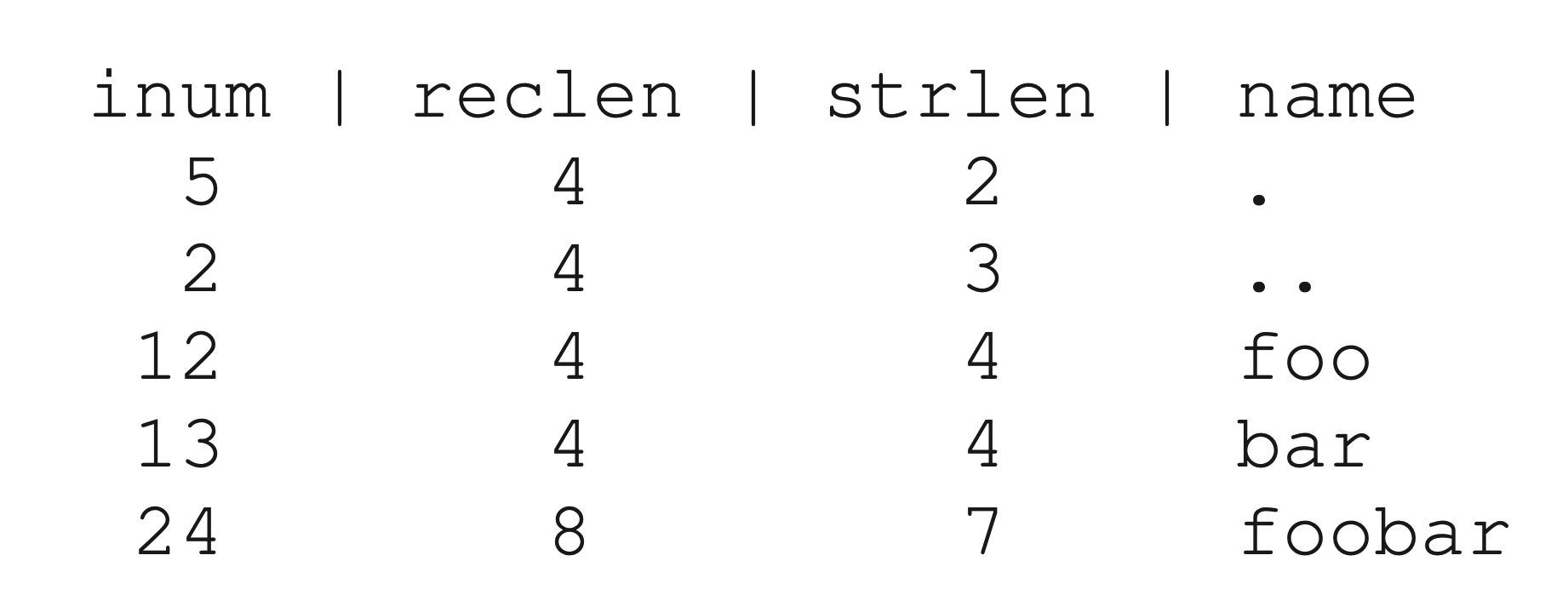
Let’s look at a simple example. Suppose we have a folder dir (inode number is 5), containing three files (foor, bar, and foobar), whose corresponding inode numbers are 12, 13, and 24. Then the information stored in the data block of this folder is as follows:
 filesystem-dir-content.png
Here reclen (record length) is the space occupied by the filename, and strlen is the actual length. Dot and double-dot are two pointers pointing to this folder itself and its parent folder. Recording reclen may seem redundant, but one must consider file deletion (a special inum, such as 0, can be used to mark deletion). If a file or directory under a folder is deleted, holes will appear in the storage. The existence of reclen allows the holes left by deletion to be reused for newly added files later.
It should be noted that linearly organizing the files in a directory is the simplest way. In practice, there are other methods. For example, in XFS, if a directory contains a particularly large number of files or subfolders, a B+ tree is used for organization. Thus when inserting, it can quickly determine whether a file with the same name already exists.
Free Space Management
When we need to create a new file or directory entry, we need to obtain an available space from the filesystem. Therefore, how to efficiently manage free space is a very important issue. We use two bitmaps for management. The advantage is simplicity; the disadvantage is that each time we must linearly scan to find all free bits, and we can only do so at block granularity — if there is remaining space within a block, it cannot be managed.
Read/Write Path
Now that we have a grasp of the data structures on disk, let’s connect the different data structures through the read/write workflow. We assume the filesystem has already been mounted: that is, the superblock is already in memory.
Reading Files
Our operation is simple: open a file (such as /foo/bar), read from it, and then close it. For simplicity, let’s assume our file size occupies one block, i.e., 4KB.
When a system call open("/foo/bar", O RDONLY) is issued, the filesystem first needs to find the inode corresponding to file bar to obtain its metadata and data location information. But right now we only have the file path, so what do we do?
The answer: traverse downward from the root directory. The root directory’s inode number is either saved in the superblock or hardcoded (for example, 2; most Unix filesystems start from 2). That is, it must be known in advance (well known).
Thus the filesystem loads the root directory’s inode from disk into memory, then through the pointers in the inode finds the data blocks it points to, and then from among all the subdirectories and folders it contains finds the foo folder and its corresponding inode. Repeating the above process recursively, the final step of the open system call is to load bar’s inode into memory, perform permission checks (comparing the process user permissions with the inode access control permissions), allocate a file descriptor, place it in the process’s open file table, and return it to the user.
Once the file is opened, a read() system call can then be issued to actually read data. When reading, it first finds the first block based on the file’s inode information (unless the offset was previously modified with lseek()), and then reads. At the same time, some metadata in the inode may be changed, such as access time. Then, the offset of this file descriptor in the process is updated, and reading continues until at some point close() is called to close the file descriptor.
When a process closes a file, much less work is required; it only needs to release the file descriptor, and there will be no real disk I/O.
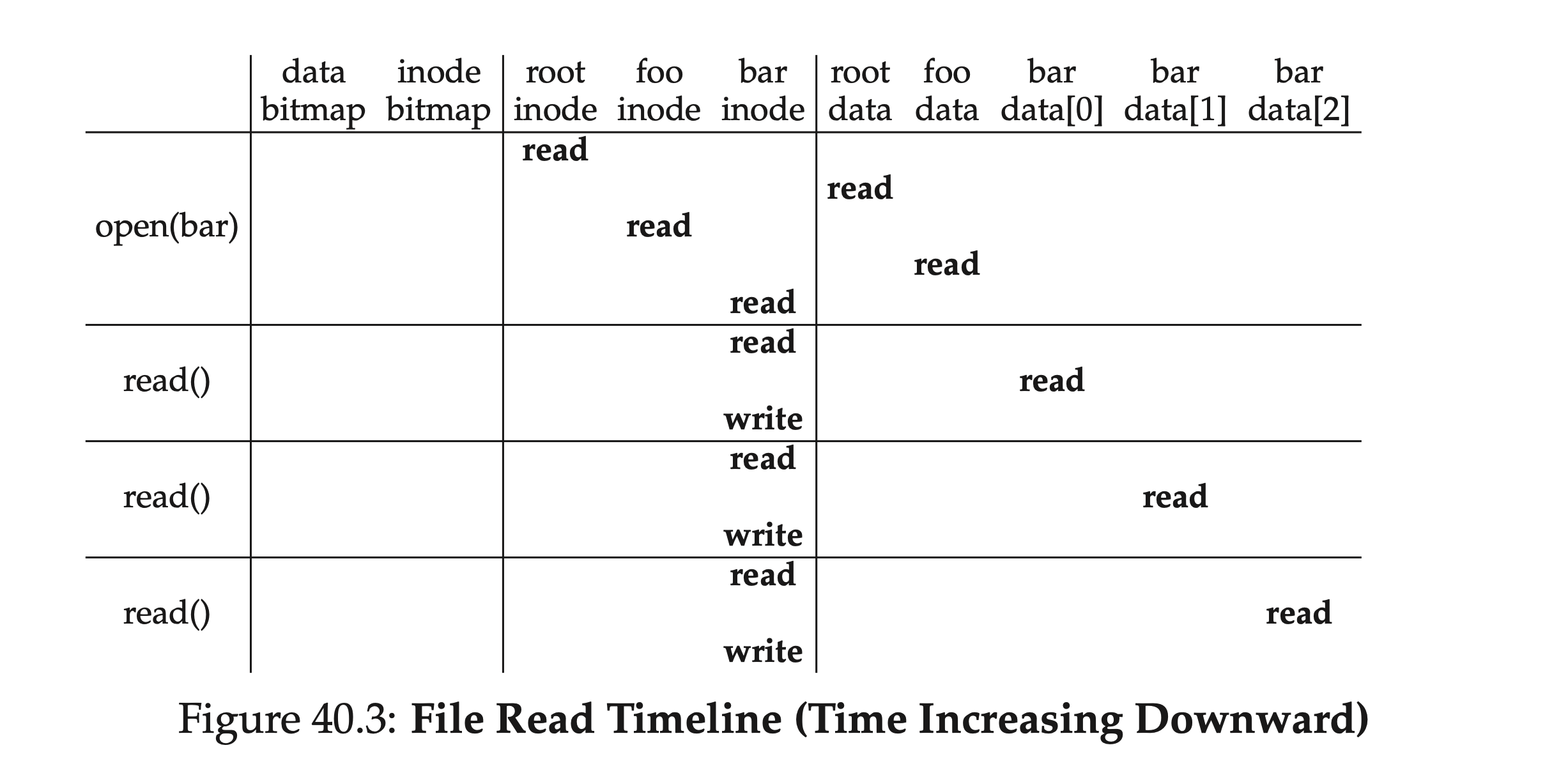
Finally, let’s go over this file reading process again. Starting from the root directory’s inode number, we alternately read inodes and corresponding data blocks until we finally find the target file. Then to read the data, we also need to update metadata such as the inode’s access time and write it back. The table below briefly summarizes this process. As can be seen, the read path does not involve allocation structures at all — the data bitmap and inode bitmap.
 filesystem-read-timeline.png
In terms of depth, if our target path has many levels, this process grows linearly; in terms of breadth, if the folders involved in intermediate lookups contain a particularly large number of directory entries — that is, the file tree is “very wide” — then each lookup within a directory may require reading more than one data block.
Writing to Disk
Writing files is very similar to reading files: also open the file (find the corresponding file all the way from the root directory); then start writing, and finally close. But unlike reading files, writing requires allocating new data blocks, which involves our previous bitmaps. Typically, a single write requires at least five I/Os:
- Read data bitmap (to find a free block and mark it as used in memory)
- Write back data bitmap (to make it visible to other processes)
- Read inode (to add a new data location pointer)
- Write back inode
- Write data into the found free block
This is only for writing to an already existing file. If creating and writing to a file that does not yet exist, the workflow is even more complex: an inode must also be created, which introduces a series of new I/Os:
- One read of the inode bitmap (to find a free inode)
- One write back of the inode bitmap (to mark an inode as occupied)
- One write to the inode itself (initialization)
- One read/write of the parent folder’s directory entry data block (adding the newly created file and inode pair)
- One read/write of the parent folder’s inode (updating modification time)
If the parent folder’s data block is not enough, new space must be allocated, requiring reading the data bitmap and data block again. The figure below shows the I/Os involved in the timeline of creating the /foo/bar file:
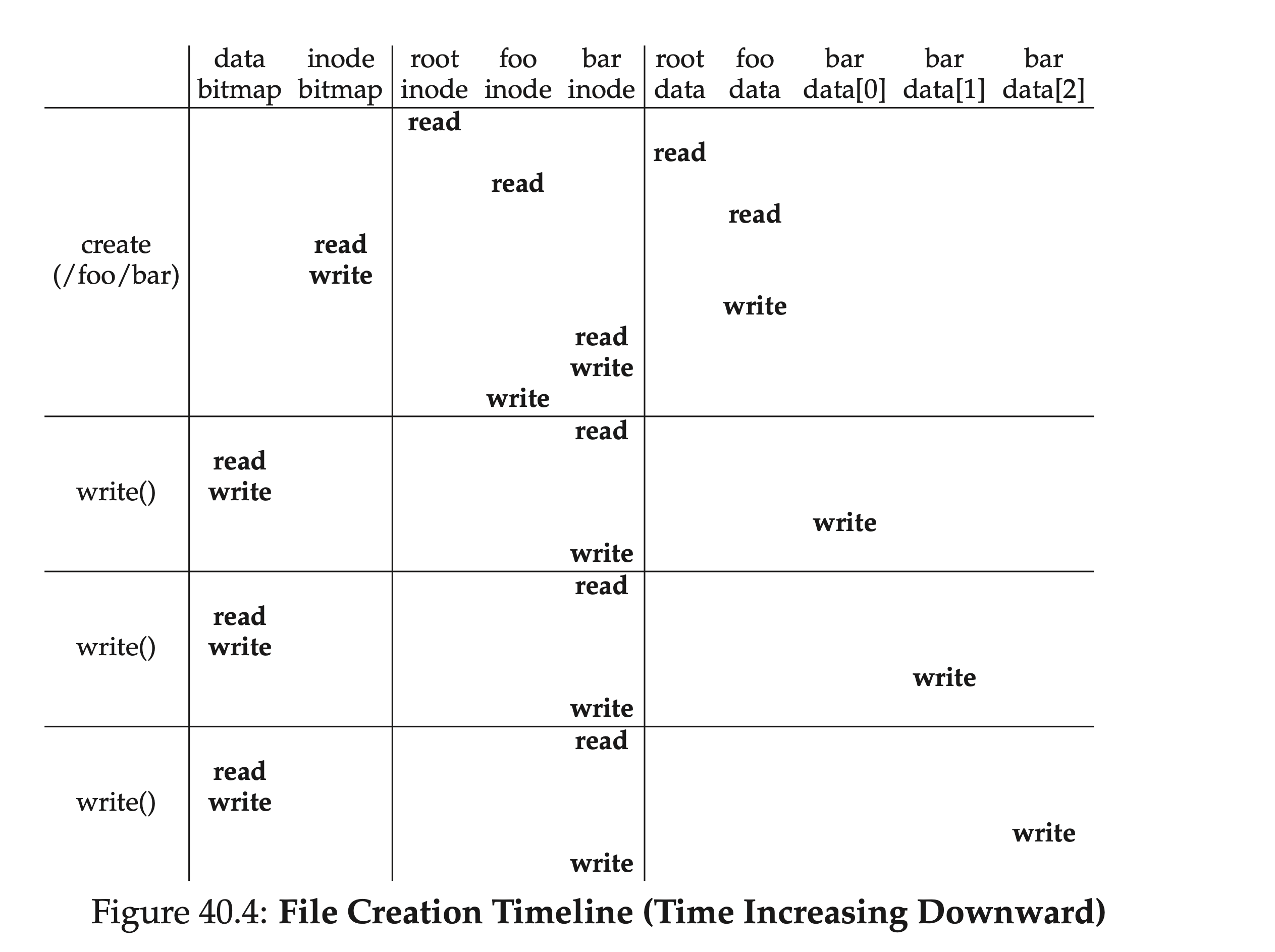 filesystem-write-timeline.png
Caching and Buffering
From the analysis of the read/write workflow above, it can be seen that even such simple read/write operations involve a large amount of I/O, which is unacceptable in practice. To solve this problem, most industrial filesystems make full use of memory, caching important (i.e., frequently accessed) data blocks in memory; at the same time, to avoid frequent disk flushing, modifications are first applied in a memory buffer, and then flushed to disk in batches.
Early filesystems introduced fixed-size caches; when full, they used replacement algorithms such as LRU for page eviction. The disadvantage is that when the cache is not full, space is wasted; when full, frequent paging may occur. We call this style static partitioning. Most modern filesystems use dynamic partitioning techniques. For example, placing virtual memory pages and filesystem pages into a single pool, called the unified page cache, making allocation more elastic for both. With caching in place, for reading multiple files in the same directory, subsequent reads can save a lot of I/O.
Since the first half of the write workflow involves reading when looking up data blocks by path, it also benefits from caching. But for the writing part, we can use buffering (write buffering) to delay disk flushing. Delayed flushing has many benefits: for example, multiple modifications to the bitmap may only need to be flushed once; accumulating a batch of changes can improve I/O bandwidth utilization; if a file is added and then deleted, the flush may be avoided entirely.
But these performance gains come at a cost — unexpected crashes may cause data loss. Therefore, although most modern filesystems have read/write buffering enabled, they also provide direct I/O to allow users to bypass the cache and write directly to disk. Applications sensitive to data loss can use the corresponding system call fsync() to flush to disk immediately.
Summary
Thus far, we have completed the implementation of a minimal filesystem. Though “small as a sparrow, it has all its vital organs”; from it we can see some basic design philosophies of filesystems:
- Use inodes to store file-granularity metadata; use data blocks to store real file data
- A directory is a special kind of file; what it stores is not file content, but directory entries of the folder
- Besides inodes and data blocks, some other data structures are needed, such as bitmaps to track free blocks
Starting from this basic filesystem, we can actually see many points of trade-off and optimization. If interested, you can build on this article to look at the designs of some industrial filesystems.