streamlit is a Python library for quickly developing simple web apps. Its slogan is:
A faster way to build and share data apps
In other words, “a faster way to build and share data applications.” It is very popular in machine learning, data science, and even today’s large language model space. Its advantages are quite prominent:
- Uses the favorite language of developers in the above fields: Python. No need to write frontend code; just
pip installand you’re ready to go. - With just a few lines of code, you can quickly whip up a web page for data visualization, labeling, and other small tools.
- It also supports rich third-party component extensions, such as the community-developed code_editor.
Of course, if you also need low latency, high concurrency, or deep customization, then sorry — that’s the part streamlit has traded off. But for small tools intended for internal use by a handful of people, streamlit is simply a godsend. You could say it occupies this small ecological niche so perfectly that it was acquired by Snowflake for $800 million in 2022.
In this article, let’s take a look at its basic design philosophy and some simple practices.
Design Philosophy
Its basic design philosophy can be summarized as:
- Write frontend in a backend language
- Rebuild upon receiving new events
- Support session-level caching
Author: 木鸟杂记 https://www.qtmuniao.com/2025/03/18/streamlit/ Please indicate the source when reposting
The above three points are sequentially progressive designs: because the frontend is written in a backend language, every user request triggers a full re-execution of the code, so of course partial refreshing is not supported; to avoid unnecessary data loading caused by full re-execution, fine-grained caching (which is lost each time the user actively refreshes the page) is introduced, thereby achieving a goal similar to partial refresh — just cache the parts that don’t need refreshing and reuse them.
Summed up in one sentence: Sequential execution for simplicity, on-demand caching for efficiency.
An Example
Let’s keep the functionality simple: the user inputs a local path to a Parquet file, and we read and display it visually.
1 | # app.py |
We simply construct data with two columns — student name and GPA — and store it in a Parquet file (the construction code is placed in the appendix). Run the following command:
1 | streamlit run app.py |
Then visit http://localhost:8501 to see the page:
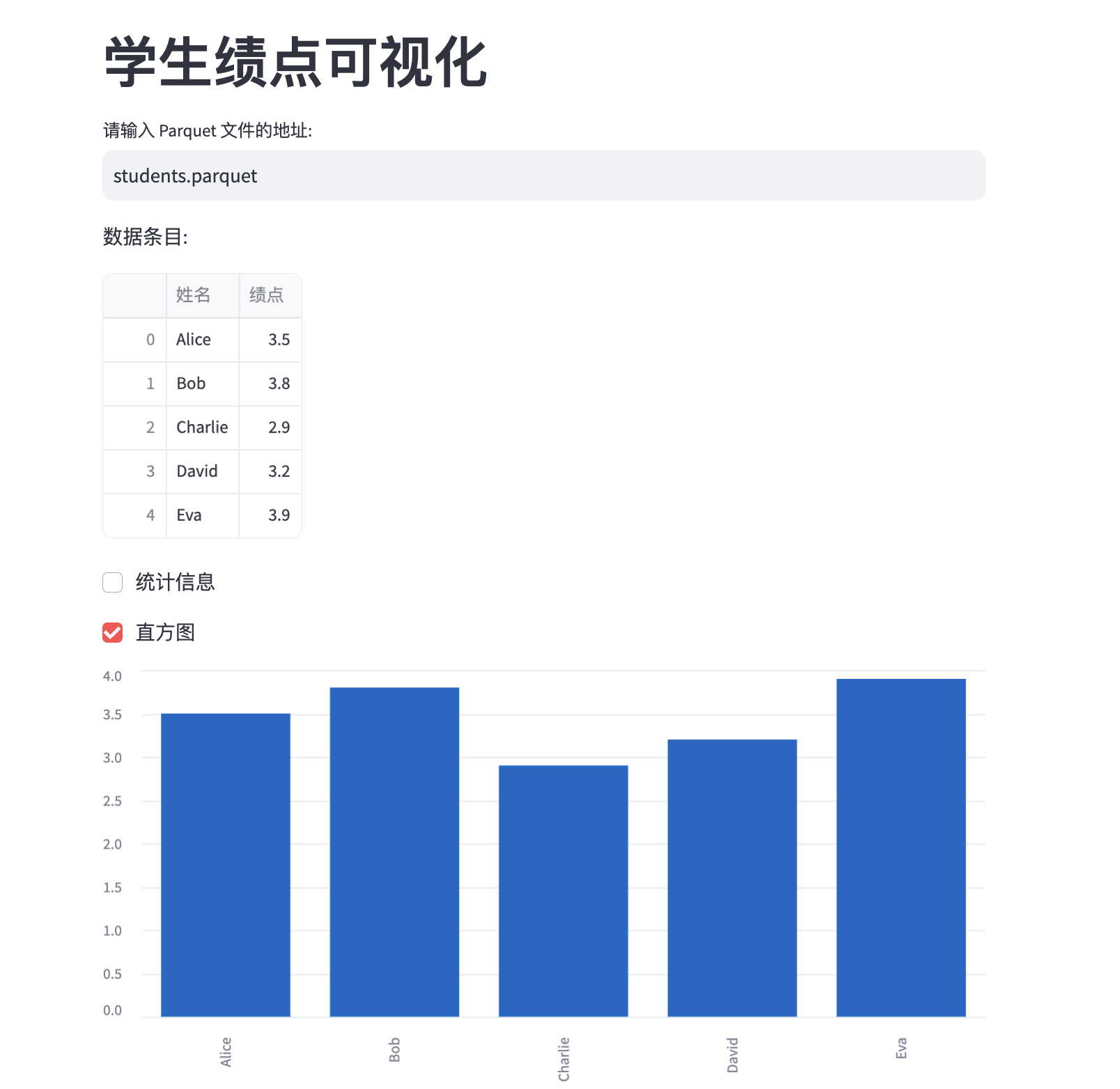 streamlit-example.png
From this example, we can roughly see that streamlit’s syntax is quite concise:
- Component construction: Through interfaces like
st.title,st.dataframe,st.checkbox, you can quickly construct many standard components without worrying about their styles. - Sequential execution: Unlike JavaScript’s event-driven model, streamlit code is executed sequentially from top to bottom, making it very easy to understand and debug. Every time you re-enter a path or re-click a checkbox, the entire page will re-render.
Caching
So the question arises: if the student table contains a large amount of data, wouldn’t it be redundant and slow to fully re-execute and reload every time a path is re-entered? To address this, we can use streamlit’s caching mechanism to cache the data.
You can explicitly cache using st.session_state:
1 | st.session_state[file_path] = data |
You can also cache by adding the @st.cache_data decorator to the data-loading function. In this case, the cache key is the function’s input parameter, which in this example is also file_path.
1 |
|
But in streamlit, we can cache not only data but also components (widgets). For example, for st.dataframe, if we don’t want it to re-render every time, just give it a key!
1 | st.dataframe(data, key=f"df-{file_path}") |
This way, as long as the key doesn’t change, the dataframe will not re-render.
At this point, we roughly understand streamlit’s philosophy from an intuitive perspective: keeping simplicity through sequential execution, maintaining efficiency through on-demand caching. Let’s summarize with a diagram:
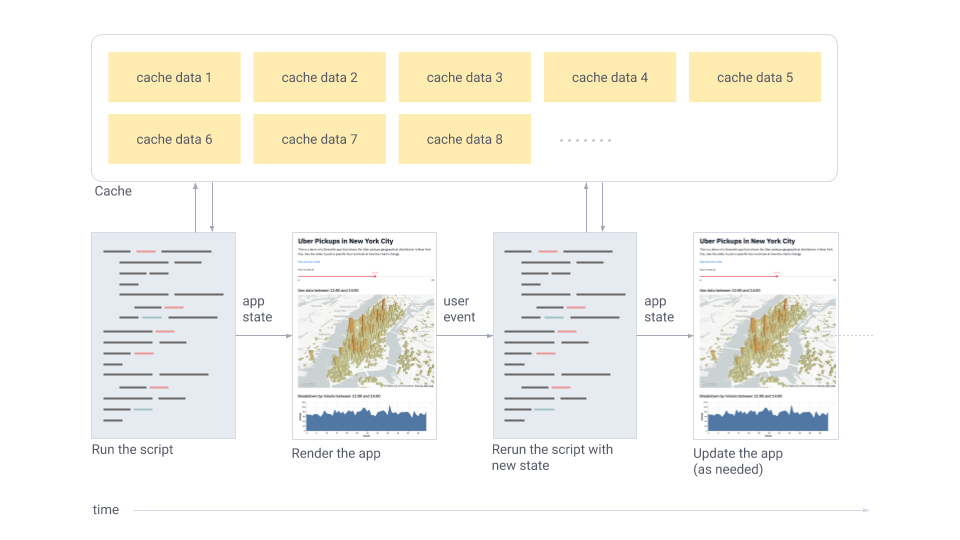 streamlit-architecture.png
Summary
This article very briefly analyzed streamlit’s design philosophy through a small example to help everyone build an intuitive understanding. If you have similar GUI needs for internal team use, it’s worth a try.
But due to space constraints, we didn’t delve into how it’s implemented behind the scenes, nor did we cover more advanced usage. If you’re interested in these topics, please leave a comment and let me know.
References
Official documentation: https://docs.streamlit.io/get-started/fundamentals/advanced-concepts
Appendix
Libraries to install:
1 | pip install streamlit pyarrow pandas |
Code to construct data:
1 | import pandas as pd |