 python-learn.png
Introduction
Before using Logging, let’s first sort out our common logging output requirements. As the saying goes, design without considering requirements is hooliganism.
- Be able to locate the origin (code file & line number) and generation time of an Event, for debugging and tracing.
- A single log can be simultaneously sent to multiple destination outputs.
- Log output can be filtered by different levels or finer-grained conditions.
- Third-party module log output can be conveniently controlled.
- While achieving all of the above, configuration/setup should be as simple as possible.
Python’s Logging module perfectly achieves the above five points through its magical modular design, organized in a tree structure.
Author: Woodpecker Miscellany https://www.qtmuniao.com, please indicate the source when reposting
Module Design
Python’s logger abstracts several subordinate meta-concepts—Logger, Handler, Filter, and Formatter—as the cornerstone of the logger implementation.
- Loggers provide the interfaces that application code can directly use.
- Handlers dispatch (logger-generated) log records to appropriate outputs.
- Filters provide fine-grained control over which logs are output.
- Formatters determine the final appearance of log records in the output.
Loggers
The Logger class serves as the basic module of the logging library and can do three small things:
- It is the class called in user code for log output, exposing interfaces such as
debug(),info(), etc.; - Based on the log level and filter class, it decides whether to create a log record (LogRecord) and pass the log output event when the user calls the class (
logger.info(msg)); - As a node in the logging module tree, it passes the event upward toward the root. All Handlers added to all logger nodes on the propagation path (this logger -> parent logger -> … -> root logger) will respond to the event. Of course, setting a logger’s
propagate = Falseor having no parent logger can prevent event propagation.
Handlers
Handler is responsible for dispatching log messages that meet the level requirements to various target outputs specified by the handler. Logger instances can add zero or more Handlers via the addHandler method. Common Handler subclasses that can be added include StreamHandler, FileHandler, BaseRotatingHandler, etc.
Imagine a scenario: an application wants to output all level log information to a file, display error level and above logs on standard output, and send all severity level and above logs via email alerts. Then three handlers can be set up, each responsible for capturing messages of different levels and sending them to different target outputs.
The most commonly used methods of Handler:
setLevel()— Like the same-name method of logger, it sets the minimum effective level. The difference is that a logger’s behavior is to send log messages above this level to all its handlers, while a handler’s behavior is to output log messages above this level to the corresponding target output.setFormatter()— Selects the layout and format of this handler’s output.addFilter()andremoveFilter— Add or remove filtering rules to determine whether a certain log message should be filtered out.
Applications should not directly use the Handler class; this is just a base class that defines some interfaces and default behaviors.
Formatters
Unlike Handler, user programs can directly instantiate and use the logging.Formatter class:
1 | logging.Formatter.__init__(fmt=None, datefmt=None, style='%') |
Where fmt specifies the message layout and format, datefmt specifies the date display format, and style specifies the variable parsing method in the fmt string.
A few points worth mentioning:
fmtcan not only specify the format; when outputting to a terminal,ColoredFormattercan be used to set a color scheme, making command-line output look cool.styleis one of%, '{' or '$', with the default being%. However, Python 3 recommends using thestr.formatstyle for string formatting, so you can change it tostyle = '{'.
Filters
Fine-grained log filtering control won’t be covered here; advanced players can refer to the official documentation themselves.
Tree Organization
The Logging library leverages the naturally existing tree-like hierarchical structure among Python Modules to build a logging system with Loggers as tree nodes. This is manifested in:
- Loggers and module_name have a one-to-one correspondence.
- A logger’s “effective level” is determined by traversing upward in the tree.
- Loggers pass events (writing a certain log) upward along the tree structure, and all logger nodes containing handlers will respond.
In addition, the logging module has a built-in root node, which provides a default implementation for all module log output behaviors. It can be obtained via root_logger = Logging.getLogger(), i.e., module_name = None. This root_logger has a default effective log level of WARNING, and has a default handler added, which is bound to a simple formatter.
That is, users don’t need any configuration; as long as they obtain the root_logger via root_logger = Logging.getLogger(), they can perform log output. Users with additional needs can then finely configure the output location and layout format for different modules through the aforementioned mechanisms. This out-of-the-box + incremental fine-tuning design is a common technique in program frameworks, which can simultaneously cater to the different needs of beginners and advanced players.
One-to-One Correspondence
Each logger is a singleton corresponding one-to-one with a Python module_name. That is, in the same process, the smap_logger obtained from different locations via:
1 | smap_logger = logging.getLogger() |
is the same instance.
Effective Level
Loggers have the concept of an effective level. When a logger has not been explicitly set to a log level (setLevel), it will use its parent logger’s log level. If its parent logger’s log level has also not been explicitly set, it will continue to look at its grandparent node. This repeats until a logger node with an explicitly set effective level is found. Of course, no matter what, this search process will end at the root node, which has a default level of WARNING.
When a logger receives a log output event, it determines whether the event will be dispatched to all handlers added to that logger based on its effective level.
Event Propagation
Child loggers pass log events along the path in the tree toward their ancestors. Therefore, it is not necessary to bind handlers to all loggers; just adding handlers to a few appropriate key top-level nodes can cause all log nodes on their child branches to perform log output according to that handler’s behavior.
Of course, you can also prevent a node from propagating log events upward by setting that logger’s propagate attribute to False.
The log output flow can be illustrated with the following diagram:
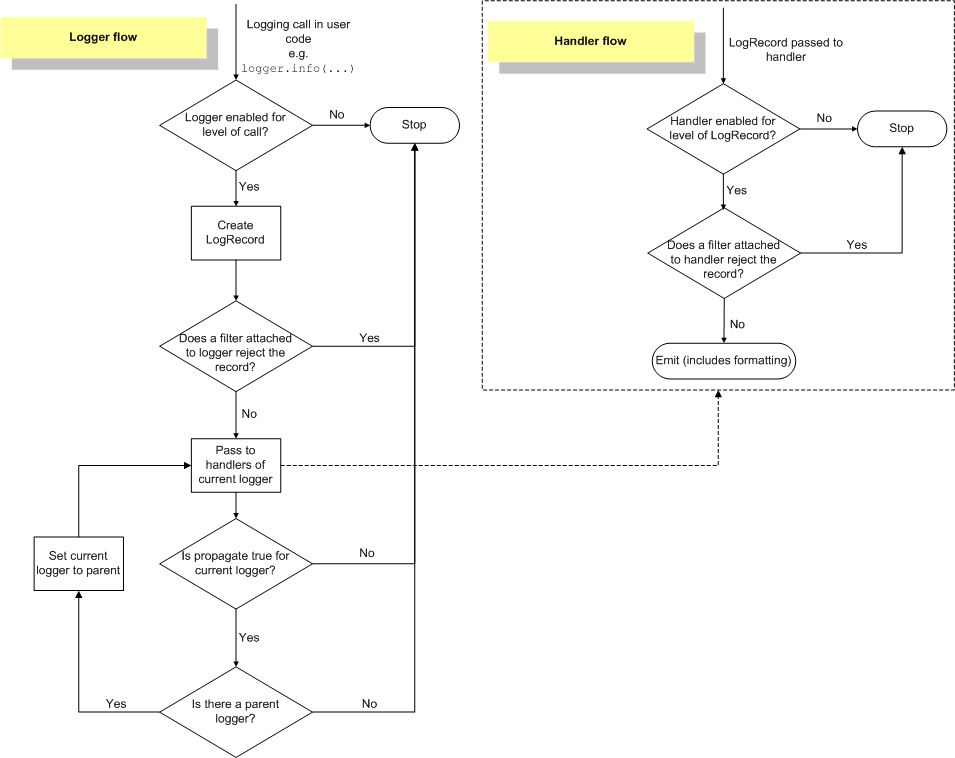 Logging Flow
Practice
An Example
A most basic example provided by the official documentation:
1 | import logging |
In addition, like Java logging frameworks such as log4j, these configurations can be done via configuration files. Including basic format and YAML format. The official documentation covers all of this.
My Own Example
When I was writing the smap (slice-map, a computing framework that shards datasets and distributes them to multiple machines for map execution) Python library, I wanted to implement a feature that would allow users to dynamically set the library’s log level when using it. At the time, I went to great lengths to pass the log level as a parameter into the framework, and then set the module’s logger to that effective level before each use.
If I had known earlier about the logging library’s module-level singleton and tree organization design, then basically nothing would need to be done to implement this feature; I would just need to tell users that I am using the logging library. Users could then simply do:
1 | import logging |
And that’s it.
Notes
「Tree」: A commonly used data structure in computers, used to simulate a data set with tree-like structural properties. It looks like an upside-down tree with the root facing up and the leaves facing down. See Wikipedia for details.
「Parent Node, Ancestor Node」: Both are concepts within the scope of the tree data structure.
「Log Event」: Generated by API calls such as logger.info(), sent to the logging system, allowing the system to decide how to respond to the event and output it at an appropriate location with an appropriate layout and format. Other terms such as Message and LogRecord essentially mean similar things.
「Destination Output」: Various output destinations, such as standard output (stdout), file (File), database (db), email (email), centralized log service (log service), etc.
References
- Logging facility for Python, most of this article is derived from this, just translated and reorganized.