When I graduated from grad school, I did an internship at NetEase Games and saved up some money. I decided to finally buy the programmer’s productivity tool I had been drooling over for so long — the MacBook Pro. The new version had just been released, so in late 2016, as soon as it hit the market, I ordered an entry-level Pro from the official website: 13-inch, two ports, no Touch Bar. But even the entry-level model cost over 10,000 RMB, and it only had two ports and no Touch Bar.
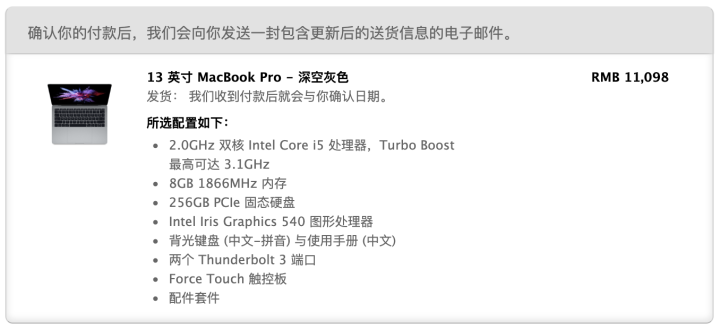 mac-buy-info.png
No Touch Bar was acceptable — after all, as a vim user, I still preferred a physical Esc key I could actually press. But only two ports — so I quietly went on JD.com and ordered a few dongles. At the time, USB-C wasn’t popular yet, so there weren’t many choices.
When it arrived, I opened it with joy and was completely amazed — the intoxicating new Space Gray color, the unprecedented thin and light design, the Unix-like system with a beautiful UI. All my previous little complaints were thrown to the back of my mind. Ah, so good.
Author: Woodpecker’s Notes https://www.qtmuniao.com, please indicate the source when reposting
However, after just two days, I discovered a horizontal line on the screen, and even the restart trick couldn’t fix it. So my brand new computer, barely warmed up, embarked on a long repair journey. Of course, after buying more and more Apple products later, I realized this was far from the last time.
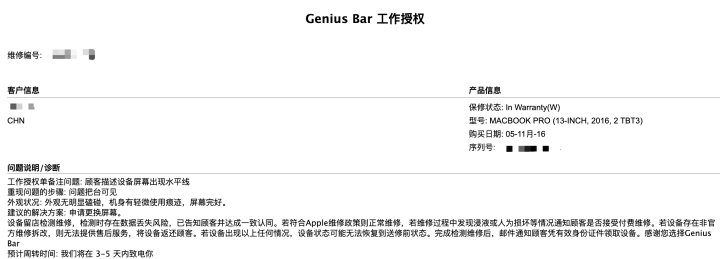 mac-keyboard.png
After the triple combo of customer service, appointment, and Genius Bar, the computer was handed over. The repair was surprisingly fast — it was ready the next day. I went to Xidan Joy City to pick it up, and a brand new computer was presented to me: wrapped in a protective film, the glossy logo covered with thin plastic, the body wiped spotless, and of course the screen was perfectly restored. They even showed me the hefty repair cost:
 mac-screen-fee.png
But you don’t have to pay a single penny. Ah, still so good.
And so I went back to my happy little life with my MacBook Pro — sliding around, tapping away, and shamelessly enjoying every moment.
As for the continuous complaints everyone had later — that Apple’s new butterfly keyboard, developed for the MacBook Pro’s thinness, had too short a key travel and a high failure rate — none of it caused even a ripple in my mind. I didn’t really feel the short key travel; on the contrary, I felt like I could type faster. And as for the so-called high failure rate, I had no such experience.
We happily spent three years together like this, until one day in mid-2019, the Z key started going beep — beep — from time to time. My heart suddenly sank. Was this the legendary key chattering? Was I the chosen one too? After the triple combo of restart, reinstall, and keycap removal, I completely gave up. Although I had researched the proper technique for removing keycaps, cleaning with alcohol, and putting them back, and saw some improvement, it was too late to save the situation.
Unfortunately, I’m lazy and highly adaptable, so I just kept putting it off, putting it off, until — the X key went on strike too. Then, when I wasn’t home, my girlfriend saw me removing keycaps before and thought it looked fun, so she tried to do it herself. When I came back that evening, looking at her apologetic eyes and the keycap with its two pins snapped, my mind raced through a thousand thoughts. Hahaha, it was time to send it for repair again.
I had heard before that Apple had a keyboard replacement program for the newer MacBook Pro models, even if you were out of warranty. But the keycap issue really made me nervous, so I prepared myself for a big bill. After another triple combo of phone call, appointment, and Genius Bar diagnosis, the Genius Bar staff gently scolded me: “This keycap counts as cosmetic damage. Next time you have a keycap issue, just bring it in — we can replace it for free. Don’t remove it yourself. I’ll let it slide this time — I’ll replace it for you first, and then we’ll process it as a key chattering issue. It should qualify for the keyboard replacement program, so it should be a free replacement.”
Speaking of keycaps, I was too embarrassed to argue. Hearing that I could still go through the keyboard replacement program, I was overjoyed and quickly changed the subject from the keycap issue, thanking her repeatedly. After checking that all other hardware was fine, she made a record and said they would notify me when the repair was done.
Again, it was very fast — the next day they notified me it was ready for pickup. So after work, with an eager little heart, I rushed to Wangfujing. After the staff verified my information, they retrieved my Mac from the workshop.
 mac-topcase.png
The moment I opened it — yes, this is the feeling. So good! The guy also said they had replaced the keyboard with the latest version, the same as the new 16-inch Pro. After using it a bit, I found the screen casing spotlessly clean and the keyboard wonderfully tactile. When signing the repair receipt, I noticed: “top case with battery.” What? They replaced the battery too?! I checked in System Information:
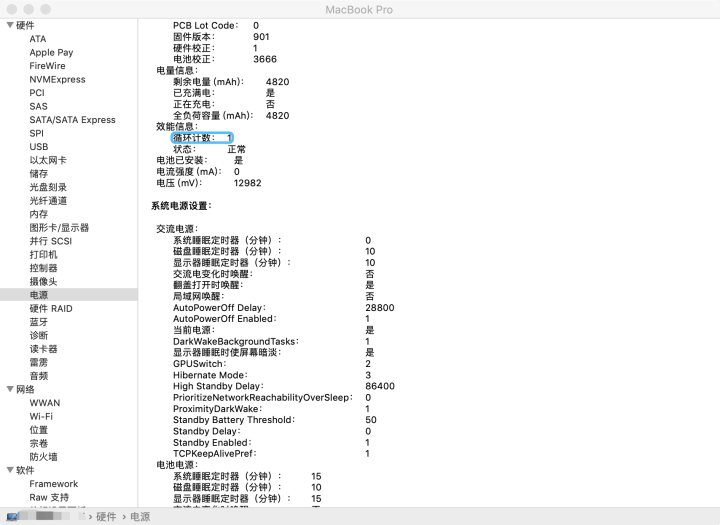 mac-system-info.png
So good, three times over.
Overall, using a Mac has been a mix of joy and sorrow, but both Genius Bar experiences were simply wonderful. Looking at my refreshed Mac, marveling at the attention to detail and the thoughtful service process, I wrote this article specifically to give them a positive review.