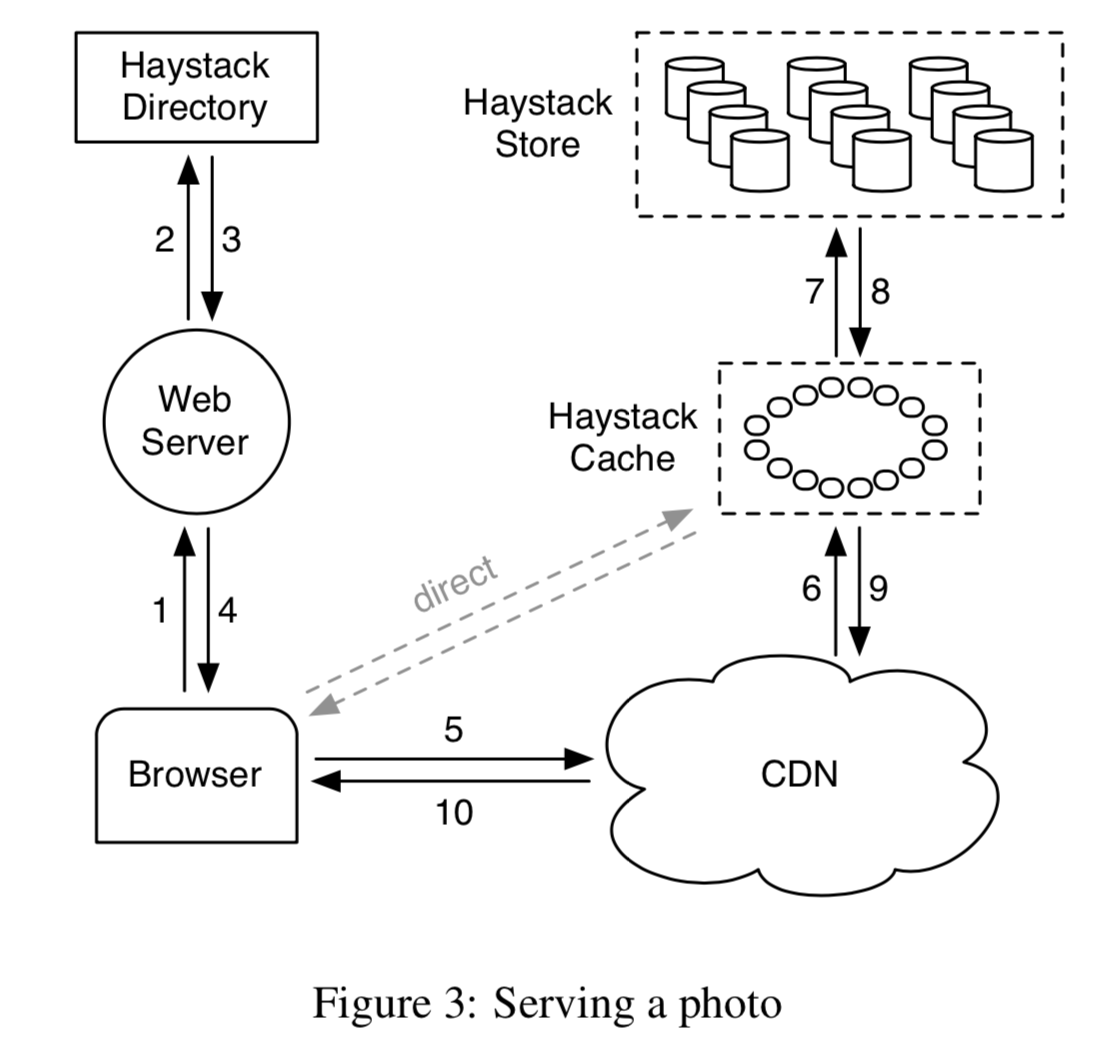
 serving a photo
Overview
The basic idea of Haystack is to keep index information in memory to avoid extra I/O. To achieve this, two main design aspects are employed:
- Aggregate small files into large files, reducing the number of files and thus the amount of metadata.
- Streamline file metadata, removing all POSIX metadata semantics that are unnecessary in Facebook’s scenario.
This reduces the data metadata to a scale that fits in memory, so that basically each data access can be completed with a single I/O, rather than several as before.
Author: Muniao’s Notes https://www.qtmuniao.com, please indicate the source when reprinting
Facebook Business Scale
26 million, 20 PB
Peak: 1 million images per second.
Key Observation
Traditional file system design leads to excessive metadata lookups. By reducing the metadata per image, Haystack is able to perform all metadata lookup operations in memory.
Positioning
Haystack is an object storage system for shared photos, targeting a dataset that is written once, read frequently, never modified, and rarely deleted. Building a custom solution was necessary because traditional storage systems performed poorly under such high concurrency.
Origin
POSIX: Directory organization, and each file stores too much metadata that we don’t need, such as user permissions. When reading a file, the metadata must be loaded into memory first. With billions of files, this is almost unbearable, especially for NAS (network attached storage).
Reading a photo requires three disk accesses:
- Translate the filename to an inode
- Read the inode from disk
- Read the file itself according to the inode information
Characteristics
High concurrency and low latency: CDN is too expensive, so the only option is to reduce the metadata per file, keep all metadata in memory, and try to achieve a single disk access.
Fault tolerance: Remote backups.
Cost: Cheaper than CDN.
Simplicity: Without long periods of refinement and testing, the only way to ensure availability is to keep things as simple as possible.
Old Workflow
First, access the web server to get the global URL of the image, which contains the image’s location information. Then use the CDN for caching: if it hits, return; otherwise, load it from photo storage into the CDN and then access it.
When a folder stores thousands of images, the directory-to-block mapping grows too large to fit in memory at once, further increasing the number of accesses.
In short, we realized that neither internal caching nor external caching (memcached) helps with long-tail access patterns.
RAM-to-disk ratio: improving this ratio is one approach, but each image occupies at least one inode, bringing at least hundreds of bits of extra metadata overhead.
New Design
Traditionally, if serving static web content becomes a bottleneck, a CDN is used. However, long-tail file access requires another approach. We admit that requests for unpopular images can hit the disk, but we can reduce the number of times this happens.
Storing one image per file results in too much metadata; the intuitive idea is to store a bunch of images in a single file.
Next, we distinguish two types of metadata:
- Application metadata, used to construct URLs that the browser can use to retrieve the image.
- File system metadata, used to let a host locate the image on its disk.
Overview
Three main components: Haystack Store, Haystack Directory, and Haystack Cache. For brevity, we will refer to them as Store, Directory, and Cache.
- Store encapsulates the persistent storage layer for images and is the only component that manages image file metadata. In implementation, we partition the storage of each host into physical Volumes. Several physical volumes on different hosts are grouped together into a logical volume. These physical volumes are then replicas of the logical volume for backup, fault tolerance, and load distribution.
- Directory maintains the mapping from logical to physical volumes, along with other application information, including the mapping from images to logical volumes and logical volumes with free space.
- Cache acts as an internal CDN. When requests for popular images arrive and the upper-level CDN is unavailable or misses, it shields direct access to the Store.
A typical URL for an image request that needs to access the CDN looks like this: http://⟨CDN⟩/⟨Cache⟩/⟨Machine id⟩/⟨Logical volume, Photo⟩
At the CDN, Cache, and Machine layers, if there is a hit, it returns; otherwise, the address of that layer is stripped, and the request is forwarded to the next layer.
serving a photo
When uploading an image, the request first hits the web server; then the server selects a writable logical volume from the Directory. Finally, the web server assigns an id to the image and uploads it to the several physical volumes corresponding to the selected logical volume.
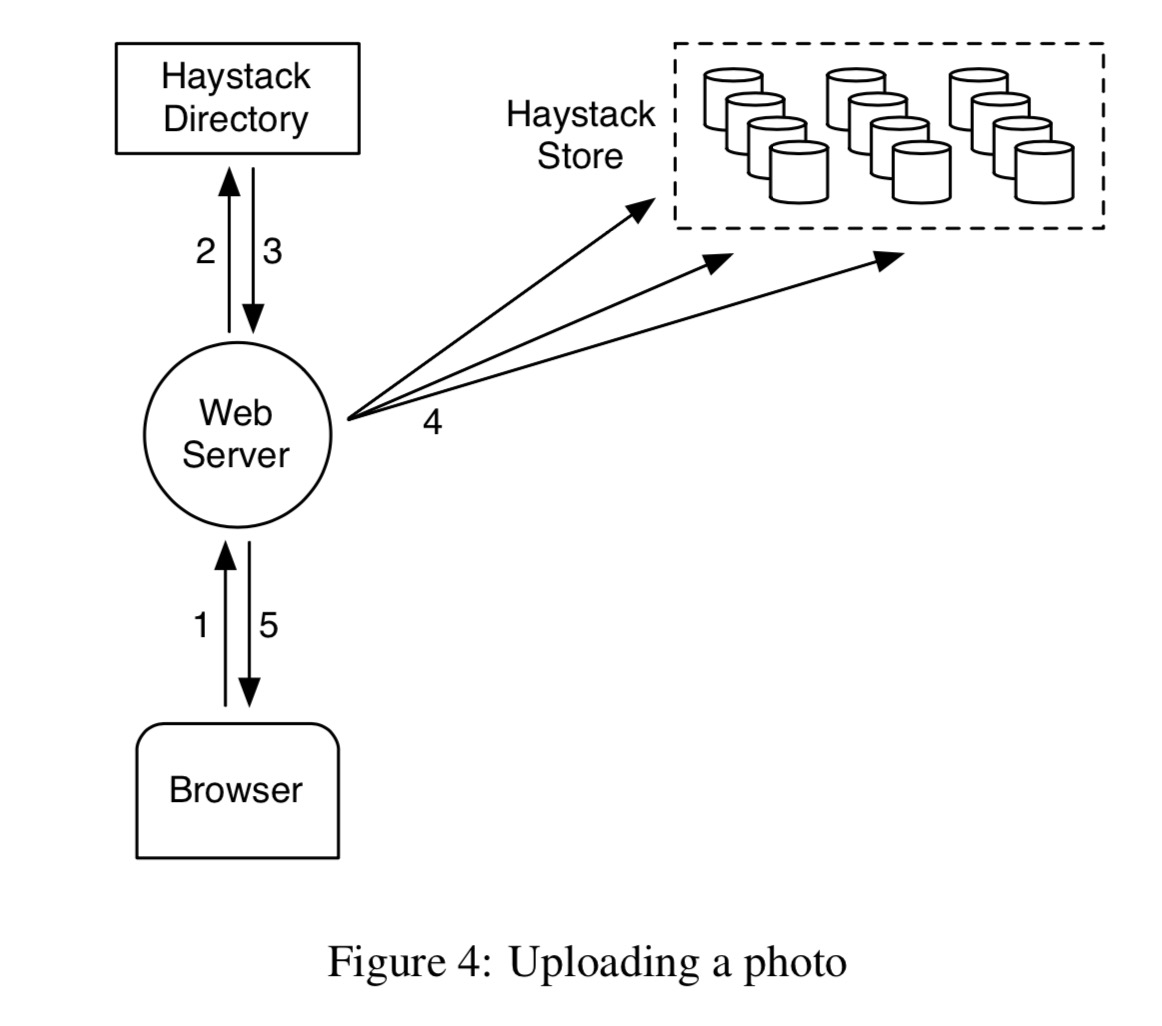 up loading a photo
Here I have two questions: 1. How is the logical volume selected? Is it related to the region of the image request? 2. There is clearly a possibility of inconsistency. That is, after selecting a logical volume from the Directory, what if during writing it turns out to be full or the write fails due to network issues? Let’s see what the paper says next.
Haystack Directory
The Directory is responsible for four aspects:
- Maintaining the mapping from logical volumes to physical volumes.
The web server uses this mapping for uploading images and constructing image request URLs.
-
Responsible for write load balancing among logical volumes and read distribution across physical volumes.
-
Deciding whether a request should be handled by the CDN or the Cache.
-
Checking whether a logical volume has become read-only due to reaching capacity or operational reasons.
Haystack Cache
The Cache receives image HTTP requests from the CDN or directly from the user’s browser. The Cache is organized as a distributed hash table and uses the image id to locate the cache. If it misses, it pulls the image from the specified Store according to the URL.
An image is cached only when the following conditions are met:
- The request comes directly from the browser rather than the CDN.
- The image is pulled from a writable server.
The reason for the second condition is: a. Images are often read soon after being written. b. Separating reads and writes makes things faster.
Haystack Store
Haystack’s main design lies in the organization of the Store.
Each physical volume is physically a large file. Each Store machine can quickly locate an image using a logical volume id + offset. A key design of Haystack is this: the filename, offset, and size of an image can be obtained without disk access. This is because each Store node always maintains the file descriptor for each physical volume’s corresponding file and the mapping from image id to its metadata in memory.
Specifically, each physical volume consists of a superblock and a series of needles. Each needle stores image metadata and the image itself. The flag is used to mark whether the image has been deleted. The cookie is randomly generated when the image is uploaded to prevent URL guessing. The alternate key is added to store different resolution versions of the same image. The data checksum is used for data integrity verification, and padding may be for hard disk block alignment.
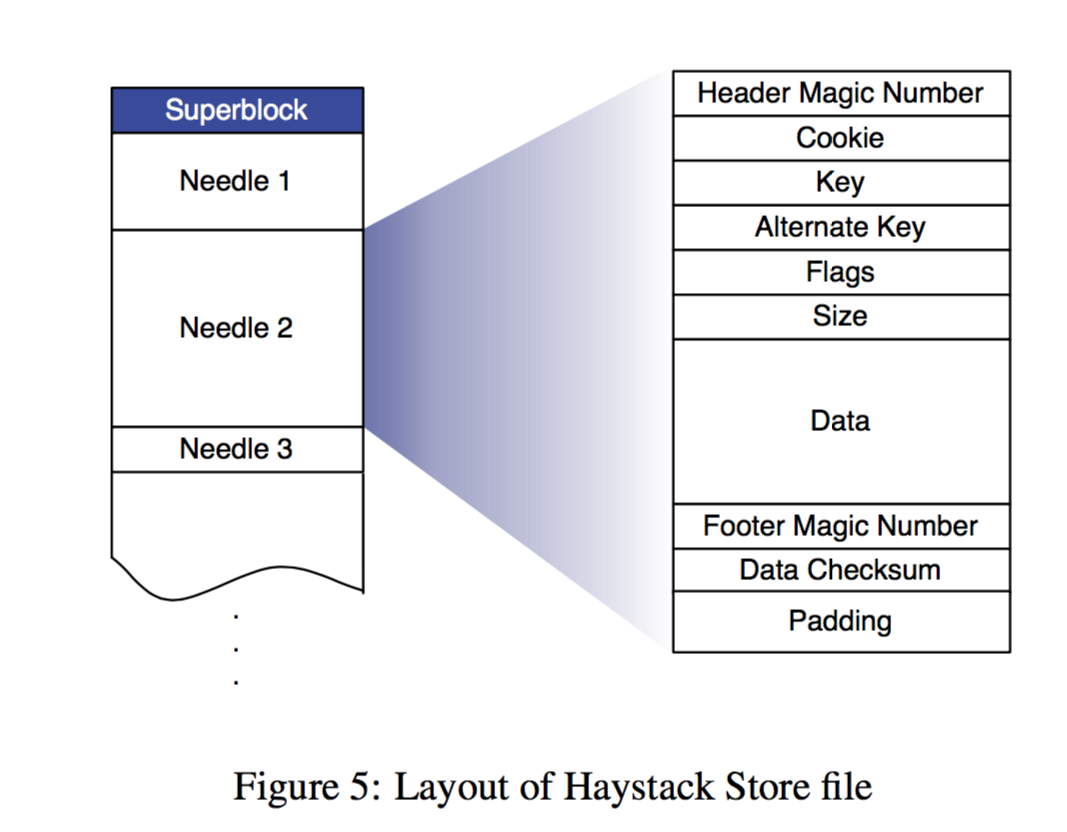 layout of haystack store file
To speed up image access, the physical machine maintains basic metadata for all images in memory, as shown below, leaving only the simplest pieces of information. To speed up the reconstruction of metadata in memory after a machine restart, the physical machine periodically takes snapshots of this metadata in memory, i.e., the index file; its order is consistent with the store file.
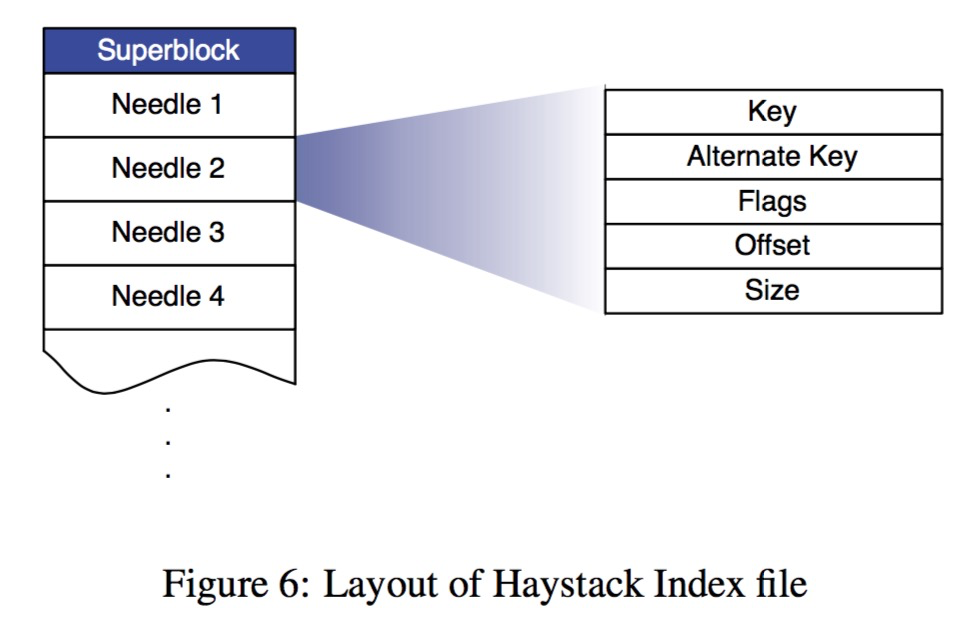 layout of haystack index file
Based on the above physical structure, let’s go through the actual flow corresponding to each Haystack API:
Photo Read
A read request from the Cache carries the volume id, key, alternate key, and cookie. The Store machine looks up the relevant metadata for the image in memory, finds (file descriptor, offset, and size), and thus reads the image file and its metadata. Then it performs cookie comparison and checksum verification, and returns the image data if passed.
Photo Write
A write request from the web server carries the logical volume id, key, alternate key, cookie, and image data. Each physical machine synchronously appends this information to the corresponding Store file. For image update requests (such as image rotation), we also simply append. However, this can cause duplicate key + alternate key pairs; if they fall on different logical volumes, the Directory only needs to update the mapping from the image to the logical volume. If they fall on the same logical volume, then the newer version can be determined by offset (it seems that in addition to the sequentially organized index file, there is also a dict using id as an index, where new and old metadata fall into the same bucket, and the one with the larger offset is taken each time).
Photo Delete
Deleting a file is straightforward: synchronously and sequentially set the flag in the metadata corresponding to the image in memory and the store file. If a request arrives for a deleted photo, an exception is reported when its flag is found set in memory. For the time being, the space occupied by images marked as deleted is temporarily unavailable; it will be reclaimed during periodic compaction.
The Index File
Now back to the index file. Since the index file is obtained by periodic snapshots, there is a crash consistency issue. This includes: a new file being written to the volume and memory but not yet to the index file before a crash; and setting the deletion flag for an image in the Store file and memory but not yet syncing it to the index file before a crash. Dealing with these two issues is also simple. For the former, when restarting and reading the index file, you can compare the volume id at the corresponding offset to see if it is the latest; if not, supplement the latest into the index and memory. For the latter, every time an image is read, in addition to checking in memory, additionally check whether the deletion flag in the Store file is set, and sync it to memory and the index file.
Filesystem
In addition, to reduce unnecessary disk reads, instead of a traditional POSIX file system, XFS, which is friendly to large files, is used.
Fault Recovery
Systems running on large-scale commodity hardware cannot avoid some errors, such as hardware driver errors, RAID controller issues, motherboard failures, etc. Our approach is also simple: do two small things, one is periodic detection, and the other is timely recovery.
We use a background task called Pitchfork to periodically check the health of each storage node (Store machine). For example, checking connectivity with each node, the availability of each volume, and trying to read some data from physical nodes for testing. Once the health check fails, the Pitchfork program marks all volume ids on that physical machine as read-only.
Once the problem is diagnosed, it is fixed immediately. Occasionally, if it cannot be fixed, the node data can only be reset first, and then data is synchronized from the backup node using a relatively heavy bulk sync operation.
Optimizations
Some common optimizations include:
Periodic Compaction: This is an online operation aimed at reclaiming space occupied by deleted files and duplicate files (with the same key and alternate key). The specific approach is to generate a new file, copy valid files one by one, and skip deleted and duplicate files. Once completed, all modification requests to that volume are temporarily blocked, and then the Store file and memory mapping are swapped.
Memory reduction: Since the flag currently only indicates whether a file is deleted, it is too wasteful. It can be changed to set the offset of the metadata corresponding to all deleted files in memory to 0. And instead of keeping the image’s cookie in memory, read it from disk. This saves about 20% of memory.
Batch uploads: Hard disks perform relatively better on average with large sequential writes than with random writes, so we pursue batch uploads as much as possible. Fortunately, users tend to upload a batch of images at once rather than a single image.
There are still some paragraphs on performance evaluation below, which I will skip for now.