I had heard about LevelDB long ago. This time, on a whim, I skimmed through the code together with some reference materials, and it truly lives up to its reputation. If you are interested in storage, if you want to use C++ elegantly, or if you want to learn how to architect a project, I recommend taking a look. Not to mention that the authors are Sanjay Ghemawat and Jeff Dean.
If I don’t produce something after reading it, given my memory, I will surely forget it soon. So I wanted to write something about the wonders of LevelDB, but I didn’t want to take the usual path: starting with an architectural overview and ending with module analysis. These days of reading code, I kept thinking about where to start. Just as I finished reading, what impressed me most was actually the various exquisite data structures in LevelDB: fitting the scenario, built from scratch, appropriately tailored, and concise in code. Why not start the LevelDB series with these small corner components?
This series mainly wants to share three classic data structures commonly used in engineering in LevelDB: the Skip List used for fast read/write of memtable, the Bloom Filter used for fast filtering of sstable, and the LRUCache used for partially caching sstable. This is the second post, Bloom Filter.
Introduction
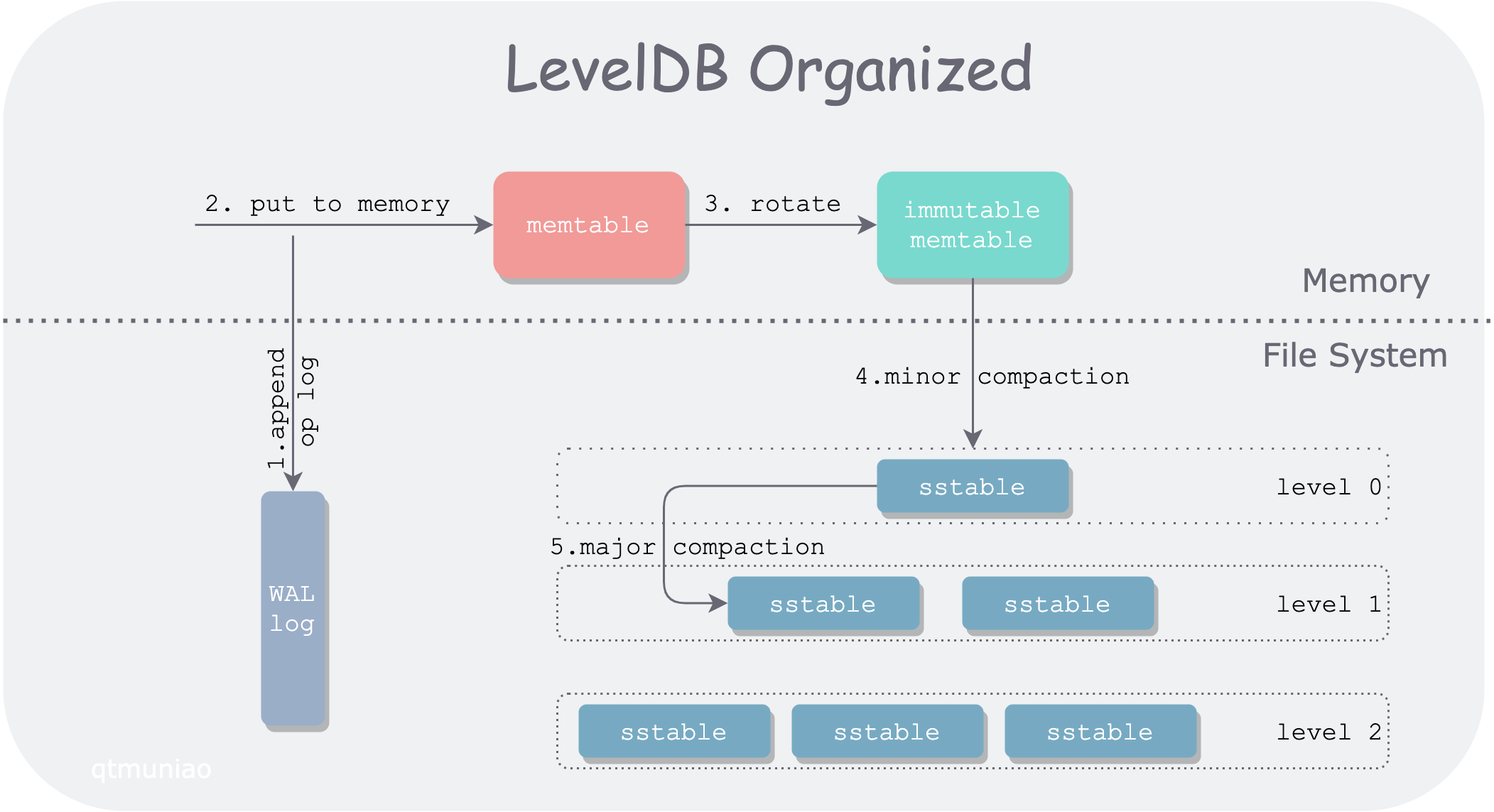
LevelDB is a single-machine KV storage engine, but it does not use a traditional balanced search tree to balance read/write performance. Instead, it uses the LSM-tree structure to organize data, sacrificing some read performance in exchange for higher write throughput. Let’s use a diagram to introduce how LSM-tree is organized across different storage media.
 leveldb.png
LevelDB divides data into two main parts, stored in memory and the file system respectively. The main data modules include WAL log, memtable, immutable memtable, and sstable. In order of data flow:
- When LevelDB receives a write request
put(k, v), it first appends the operation log to the log file (WAL) for recovery in case of unexpected node crashes. - After writing the WAL, LevelDB inserts this kv pair into the lookup structure in memory: memtable.
- After memtable accumulates to a certain degree, it rotates into a read-only memtable, i.e., immutable memtable; at the same time, a new memtable is generated for writing.
- When memory is under pressure, the immutable memtable is sequentially written to the file system, generating a level0 sstable (sorted strings table) file. This process is called a minor compaction.
- Since query operations need to traverse memtable, immutable, and sstables layer by layer. As more and more sstable files are generated, query performance will inevitably degrade, so different sstables need to be merged, which is called major compaction.
LevelDB Hierarchical Organization
All sstable files in the file system are logically organized by LevelDB into multiple levels (usually 7 levels), satisfying the following properties:
- The larger the level, the earlier its data was written. That is, data is first “placed” in the upper level (minor compaction), and when the upper level is “full” (reaches capacity limit), it “overflows” to the lower level for merging (major compaction).
- Each level has a limit on total file size, growing exponentially. For example, the total size limit of level0 is 10MB, level1 is 100MB, and so on. The highest level (level6) has no limit.
- Since each sstable file in level0 is directly flushed from memtable, the key ranges of multiple sstable files may overlap. For other levels, multiple sstable files are guaranteed not to overlap through certain rules.
For a read operation in LevelDB, it needs to first search memtable and immutable memtable, and then search each level in the file system in turn. It can be seen that compared to write operations, read operations are rather inefficient. We call the phenomenon where a single read request from the client is turned into multiple read requests inside the system read amplification.
To reduce read amplification, LevelDB takes several measures:
- Minimize sstable files through major compaction
- Use fast filtering methods to quickly determine whether a key is in a certain sstable file
And to quickly determine whether a key is in a key set, LevelDB uses exactly the Bloom filter. Of course, the Bloom filter can only quickly determine that a key is definitely not in a certain sstable, thereby skipping certain sstables during layer-by-layer lookups. The reason will be detailed later; we will leave it here for now.
Author: 木鸟杂记 https://www.qtmuniao.com/2020/11/18/leveldb-data-structures-bloom-filter, please indicate the source when reposting
Principles
Bloom Filter was proposed by Burton Howard Bloom in 1970. The related paper is: [Space/time trade-offs in hash coding with allowable errors](Space/time trade-offs in hash coding with allowable errors). By yielding only a little accuracy, it gains efficiency in time and space — a truly ingenious design.
Data Structure
Bloom Filter uses a bit array underneath. Initially, when the represented set is empty, all bits are 0:
 empty-bloom-filter.png
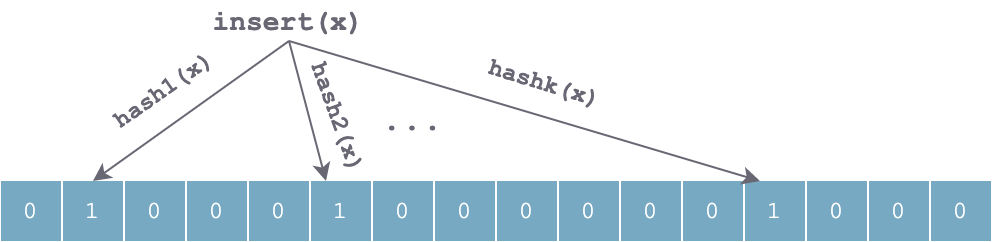
When inserting an element x into the set, k independent hash functions are used to hash x respectively, and then the k hash values are taken modulo the array length to set the corresponding positions in the array to 1:
 set-x-bloom-filter.png
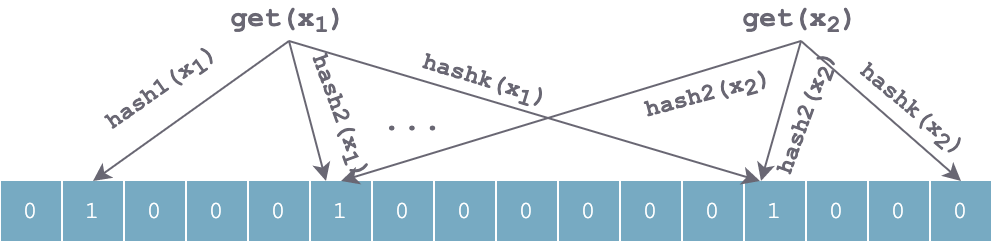
The lookup process is similar to the insertion process. It also uses the same k hash functions to hash the element to be searched in sequence, obtaining k positions. If all k positions in the bit array are 1, the element may exist; otherwise, if any position has value 0, the value definitely does not exist. For the figure below, x1 may exist, x2 definitely does not exist.
 get-x-bloom-filter.png
After continuously inserting some elements, a large number of positions in the array will be set to 1. It is imaginable that there will definitely be some position conflicts, causing false positives. Using k independent hash functions can partially solve this problem. However, if for some value y, the k positions calculated by hash(y) happen to have been set to 1 by several elements inserted at other times, it will be falsely judged that y is in the set.
Time and Space Advantages
Compared to other data structures representing datasets, such as balanced binary search trees, Trie trees, hash tables, or even simpler arrays or linked lists, Bloom Filter has huge time and space advantages. The data structures mentioned above mostly need to store the data items themselves, some may be compressed, such as Trie trees. But Bloom Filter takes another path: it does not store the data items themselves, but stores several hash values of the data items, and uses an efficient and compact bit array to store them, avoiding the extra overhead of pointers.
This design makes the size of Bloom Filter independent of the size of the data items themselves (such as the length of strings). For example, for a Bloom Filter with 1% error rate and optimal k (number of hash functions), each element requires only 9.6 bits on average.
The gain of this advantage can be understood as ignoring collision handling on the basis of a hash table, thereby saving extra overhead.
Parameter Trade-offs
From the above, we can roughly feel that the false positive rate of Bloom Filter should be related to the following parameters:
- The number of hash functions k
- The length of the underlying bit array m
- The dataset size n
The derivation of the relationship between these parameters and the false positive rate is not detailed here. You can refer to Wikipedia, or this CSDN article. Here we directly give the conclusion:
When k = ln2 * (m/n), Bloom Filter achieves optimal accuracy. m/n is bits per key (the average number of bits allocated to each key in the set).
Source Code
After laying the background and basic principles of Bloom Filter, let’s see how LevelDB source code embeds it into the system.
General Interface
To reduce read amplification, especially disk access read amplification, LevelDB abstracts a FilterPolicy interface to quickly filter out unsatisfied SSTables when looking up keys. This Filter information is stored together with data in the SSTable file and loaded into memory when needed, which requires that the Filter does not occupy too much space.
1 | class LEVELDB_EXPORT FilterPolicy { |
Abstracting this interface allows users to implement other filtering strategies according to their own needs. Naturally, LevelDB provides a built-in filtering policy that implements this interface: BloomFilterPolicy:
1 | class BloomFilterPolicy : public FilterPolicy { |
According to the above source code, there are several points to note in LevelDB’s implementation:
- The bit array mentioned earlier is represented using a char array in C++ in LevelDB. Therefore, when calculating the bit array length, it needs to be aligned to a multiple of 8, and appropriate conversion is needed when calculating indices.
- LevelDB does not actually use k hash functions in its implementation, but uses the double-hashing method for an optimization, claiming to achieve similar accuracy.
Summary
Bloom Filter is usually used to quickly determine whether an element is in a set. It essentially exchanges tolerance for a certain error rate for time and space efficiency. From an implementation perspective, it can be understood as saving the collision handling part on the basis of a hash table, and reducing false positives through k independent hash functions. LevelDB uses an optimization in its implementation: using one hash function to achieve an effect approximating that of k hash functions.
In the next post, I will continue to analyze another classic data structure used in LevelDB: LRU cache (LRU cache).
References
- LevelDB handbook:https://leveldb-handbook.readthedocs.io/zh/latest/bloomfilter.html
- Wikipedia:https://en.wikipedia.org/wiki/Bloom_filter