Google LevelDB is a canonical implementation of LSM-Tree. However, after being open-sourced, in order to maintain a lightweight and concise style, besides fixing bugs, it has not seen major updates. To make it capable of meeting diverse workloads in industrial environments, Facebook (Meta) forked LevelDB and made optimizations in many aspects. On the hardware side, it can more effectively utilize modern hardware such as flash memory, fast disks, and multi-core CPUs; on the software side, it has made numerous optimizations for read/write paths and Compaction, such as SST indexing, index sharding, prefix Bloom Filter, column families, etc.
This series of articles, based on the RocksDB blog series, combined with source code and some practical experience, shares some interesting optimization points, hoping to inspire everyone. Due to limited expertise, any inaccuracies are welcome to be discussed in the comments.
This is the first article in the RocksDB optimization series. To optimize deep lookup performance, SST files at different levels are indexed in a certain way.
Author: 木鸟杂记 https://www.qtmuniao.com/2022/08/21/rocksdb-file-indexer Please indicate the source when reposting
Background
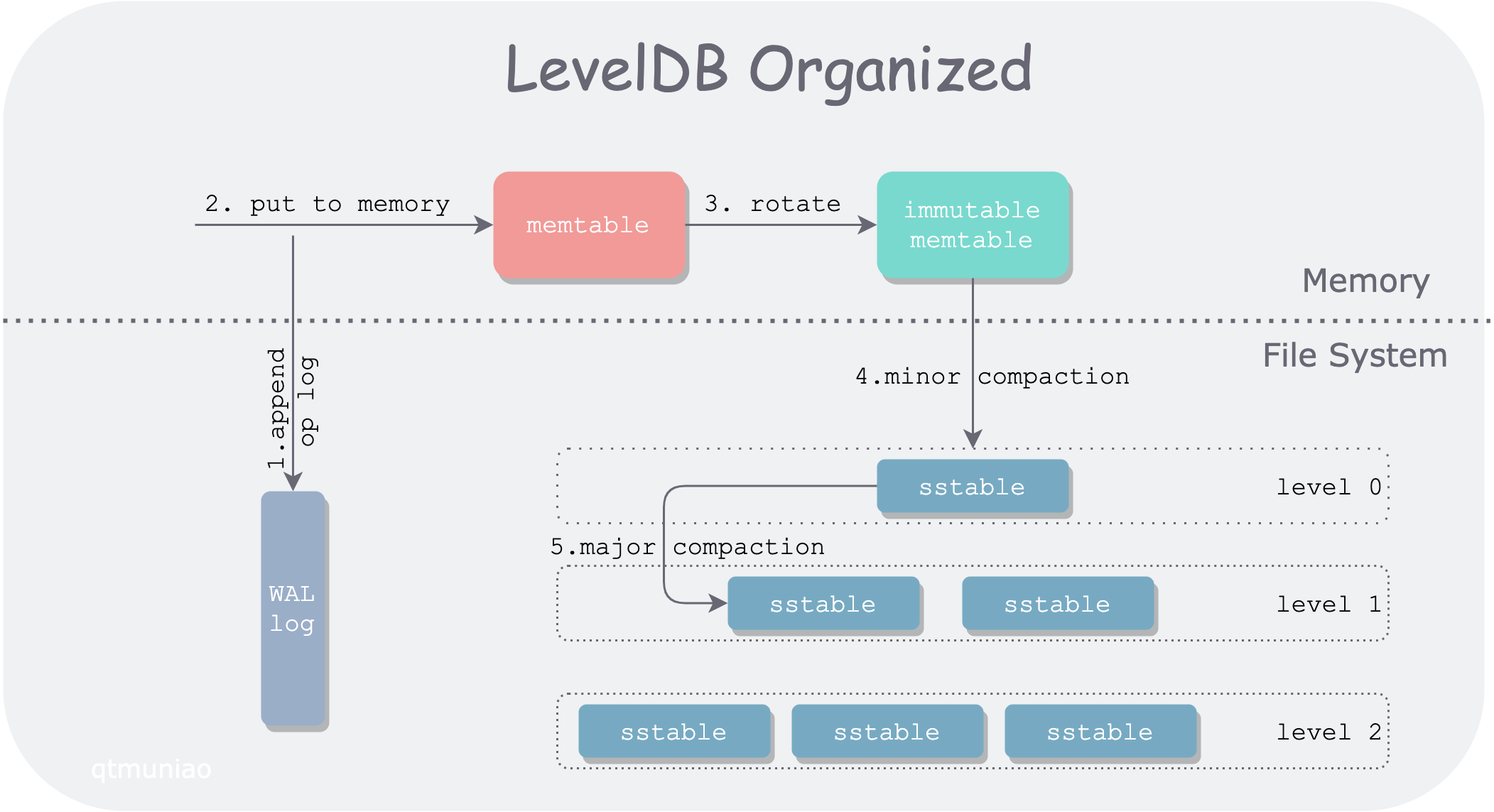
First, here is the LevelDB architecture diagram drawn in a previous article.
 leveldb.png
In LevelDB, a Get() request path passes through:
- a mutable memtable
- a series of immutable memtables
- a series of SST files organized by level
Among them, SST files in level 0 are directly flushed from immutable memtables, and their key ranges (bounded by FileMetaData.smallest and FileMetaData.largest) mostly overlap with each other. Therefore, in level 0, all SST files must be searched one by one.
SST files in other levels are produced by compaction from upper-level SST files, causing data to continuously settle from upper to lower levels. The compaction process merges multiple SST files together, squeezing out “moisture” (duplicate keys), and then splits them into multiple SST files. Therefore, below level 1, all SST files have non-overlapping and ordered key ranges. This organization allows us to perform binary search within a level (O(log(N)) complexity), rather than linear search (O(N) complexity).
The specific search method is to use the target lookup value x and the array composed of each file’s FileMetaData.largest as the binary search object, continuously narrowing the search range to determine the target SST file. If no SST file containing x’s key range is found, or the corresponding SST file does not contain x, continue searching downward.
But with large data volumes, the number of files in lower levels is still very large. For high-frequency Get operations, even with binary search, the number of comparisons per level grows linearly. For example, with a fan-out ratio of 10, where the number of lower-level SST files is ten times that of the adjacent upper level, level 3 will have nearly 1000 files, requiring about 10 comparisons in the worst case. At first glance it doesn’t seem like much, but at million-level QPS, this is a considerable overhead.
Optimization
Analysis
It can be observed that under LevelDB’s version mechanism, within each version (VersionSet, saved by the Manifest file) the number of SST files is fixed, and their positions are also fixed; thus the relative positions of SST files across different levels are also determined.
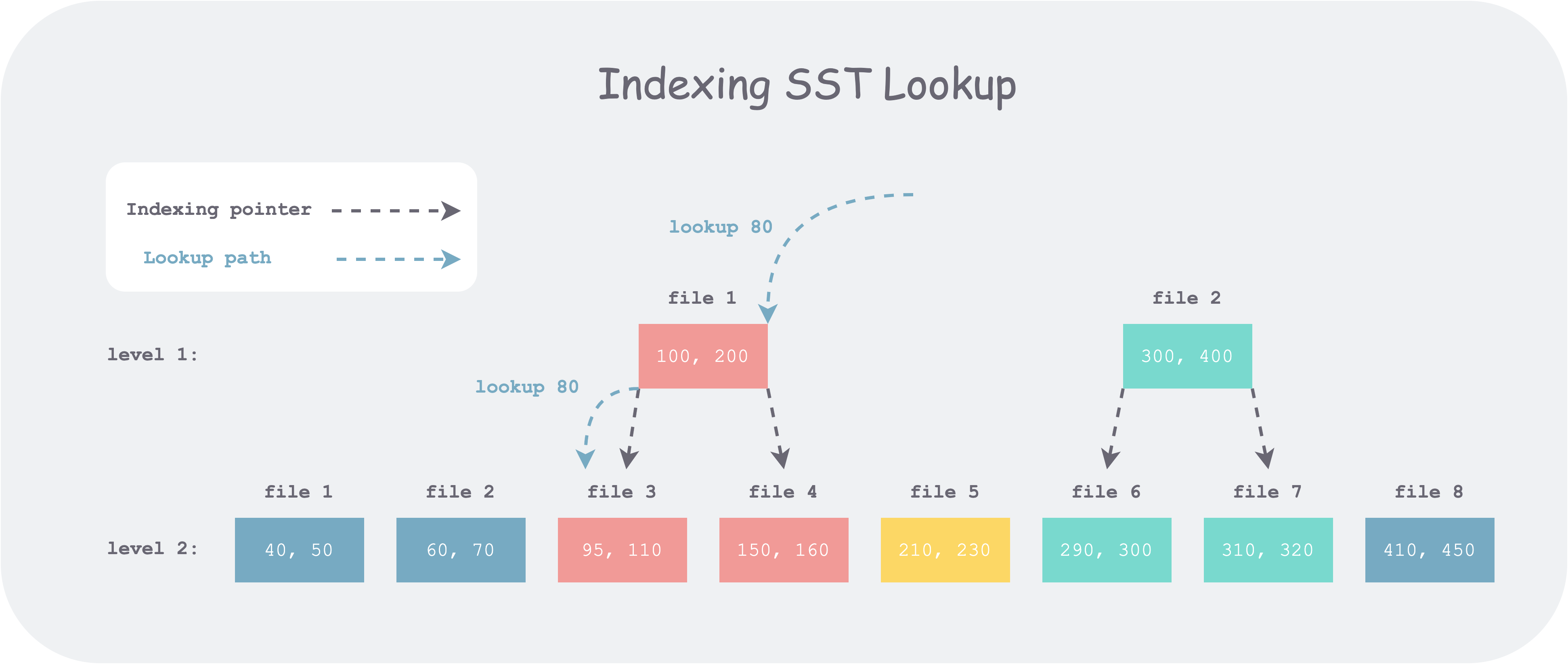
Therefore, when we search at each level, we don’t actually need to start the binary search from scratch; some position information already binary-searched at upper levels can be reused. Thus, we can add some inter-level index structures similar to search trees (such as B+ trees) to reduce the binary search range at lower levels. This idea is called Fractional cascading.
 indexing-sst.png
For example, as shown in the figure above, level 1 has 2 SST files, and level 2 has 8 SST files. Suppose we want to look up 80. First, we search among all files’ FileMetaData.largest in level 1 and get candidate file 1, but by comparing with its bounds we find it’s less than its lower bound. So we continue to search level 2. If there is no index on SST, we need to binary search all eight candidate files; but if there is an index, as shown above, we only need to binary search the first three files. Thus, the number of comparisons per level can be kept at a constant level N (the fan-out factor, i.e., the max_bytes_for_level_multiplier configuration item in RocksDB), without increasing linearly as the levels deepen (log(N^L) = N*L).
Implementation
In RocksDB, the version is determined after each compaction; only compaction changes SST. Therefore, the inter-level SST index can be built when building SST during compaction. When building, each SST file’s upper and lower bounds each correspond to a pointer. So how to determine where each pointer points? Similar to the lookup process, take the key corresponding to the upper or lower bound, search in the array composed of all lower-level SST files’ FileMetaData.largest, and point it to the right-bound file corresponding to that value in the lower level. The reason for this choice is that through this pointer (e.g., the pointer for 100), all files to the right of the pointed file (e.g., file3) in the next level (file4, file5, …) can be cut off, thereby reducing the search range.
For example, in the figure above, level 1 file1’s upper and lower bounds are 100 and 200 respectively. For 100, after searching it falls into level 2 file 3, so it points to file 3; for 200, after searching it falls to the left of 210, so it points to file 4.
Code
But in RocksDB’s actual code (this feature was introduced in 3.0), for any upper-level file, four indexes are actually recorded. By subdividing the boundary ranges, the search range can be further reduced. The basic idea is to spend twice the time and compute twice the boundaries when building FileIndexer; when searching, the lookup range can be further narrowed. Since SST is built once and queried many times, this tradeoff is worthwhile.
1 | struct IndexUnit { |
The comments above look rather convoluted, but starting from how to use them makes them easier to understand. Suppose the value we are looking for is x, and the upper and lower bounds of some upper-level file are [smallest, largest]. Then these bounds divide the key space into five intervals: (-∞, smallest), smallest, (smallest, largest), largest, (largest, +∞). Considering only the case where the search of this file ends and we need to go to the lower level, we have:
- If x < smallest, we need to look in the rightmost file in the lower level that is smaller than smallest (
smallest_rb). - If x == smallest, i.e., smallest ≤ x ≤ smallest, we need to start looking from the leftmost file in the lower level that is larger than smallest (
smallest_lb), and stop at the rightmost file in the lower level that is smaller than smallest (smallest_rb). - If smallest < x < largest, we need to start looking from the leftmost file in the lower level that is larger than smallest (
smallest_lb), and stop at the rightmost file in the lower level that is smaller than largest (largest_rb). - If x == largest, i.e., largest ≤ x ≤ largest, we need to start looking from the leftmost file in the lower level that is larger than largest (
largest_lb), and stop at the rightmost file in the lower level that is smaller than largest (largest_rb). - If x > largest, we need to start looking from the leftmost file in the lower level that is larger than largest (
largest_lb).
Corresponding code is as follows:
1 | if (cmp_smallest < 0) { // target < smallest, use smallest_rb as the right bound |
Note: When x == smallest or x == largest, for RocksDB’s use case, the upper level has already found it, so there is no need to search lower levels. But the FileIndexer’s application scenario is more generalized; for example, you can use it to find all results equal to a given value in lower levels.
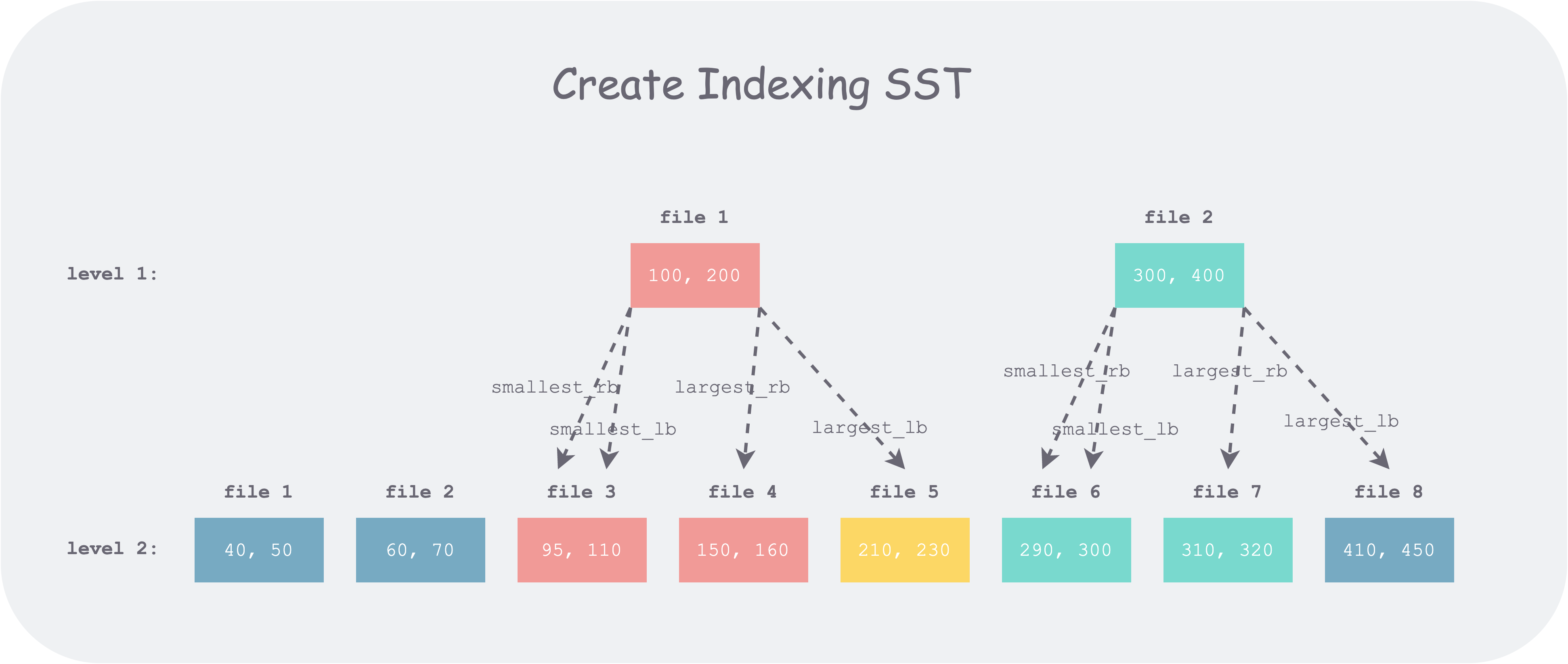
Below, still using the previous example, let’s explain with a figure:
 create-indexing-sst.png
It can be seen that when an upper-level file boundary (e.g., 100) falls within a lower-level file (e.g., file 3 [95, 110]), the lb and rb pointers of that boundary point to the same location, degenerating into a single pointer; when the file boundary (e.g., 400) falls in a gap between lower-level files (e.g., between file 7 and file 8), lb and rb point to different locations, thus reducing one file to scan compared to a single pointer overall.
On the other hand, note that when an upper-level file boundary value (e.g., 400) falls in a gap between lower-level files (i.e., that value definitely does not exist in the lower level), we have largest_rb < largest_lb. If the search value is 400, using these pointers directly causes left_bound > right_bound, and the search ends.
In the specific implementation, RocksDB uses a two-pointer comparison method: one pointer iterates the upper level and one pointer iterates the lower level; a single pass can establish one kind of index for all files. To reduce branch judgments in the code and make the logic clear, RocksDB splits the construction process into four passes, building the above four pointers respectively, with logic encapsulated in two functions: CalculateLB and CalculateRB.
Below, using the CalculateLB code as an example, a brief annotated analysis:
1 | // Calculate the leftmost (first from left to right) file index in lower_files that is greater than a given value |
Four passes of calls respectively assign values to the four fields of each upper-level file’s index item IndexUnit.
1 | CalculateLB( |
Summary
The method of building an index for SST is relatively intuitive (analogous to a B+ tree) and easy to understand. But corresponding to the code implementation, there are many details and edge cases to handle, and it’s easy to make mistakes. Just like binary search, it can be written in elaborate ways; nothing else, just practice more.
References
- RocksDB blog, Indexing SST Files for Better Lookup Performance, http://rocksdb.org/blog/2014/04/21/indexing-sst-files-for-better-lookup-performance.html
- Wikipedia, Fractional cascading, Fractional cascading, https://en.wikipedia.org/wiki/Fractional_cascading
- RocksDB github FileIndexer: https://github.com/facebook/rocksdb/blob/3.0.fb.branch/db/file_indexer.cc