Snowflake was founded in 2012 by two former Oracle employees, targeting cloud-native data warehouses from the very beginning. Therefore, its architectural design was (at the time) considered very “radical.” This forward-looking vision brought extraordinary returns — Snowflake went public in 2020 with a market capitalization reaching as high as $70 billion, setting the record for the largest software IPO in history.
In this article, we combine two papers — The Snowflake Elastic Data Warehouse and Building An Elastic Query Engine on Disaggregated Storage — to roughly discuss its architectural design.
This article comes from my column “System Thinking Daily.” If you find it helpful, feel free to subscribe to support me.
I have wanted to write this article for a long time, but I got stuck while reading the papers last time — there was too much information, and carpet-bombing reading soon drowned me in details. At that time, I only read two-thirds of it and then put it aside. Last week (2024-07-07), when mentioning the disaggregated-storage Snowflake in the article Spark: How to Scale Down in the Cloud, a reader asked me to write about it, so I picked it up again.
Compared with the push approach last time, this time I adopted a pull approach: that is, instead of passively reading papers, I first thought about how I would design such a cloud-native data warehouse and what problems I might encounter. With these questions in mind, I went back to the papers for answers, and found that the efficiency improved dramatically, which also prevented this article from being abandoned again.
Author: 木鸟杂记 https://www.qtmuniao.com/2024/08/25/snowflake-paper/ Please indicate the source when reposting
Overview
Snowflake’s main design goals are as follows:
- Storage-Compute Separation: Therefore, both storage and compute can be elastically scaled and billed based on actual usage.
- Multi-tenancy: Ensuring isolation between tenants.
- High Performance: Maximizing performance under the premises of 1 and 2.
Architecture
To achieve the above design goals, let’s first look at Snowflake’s overall architecture:
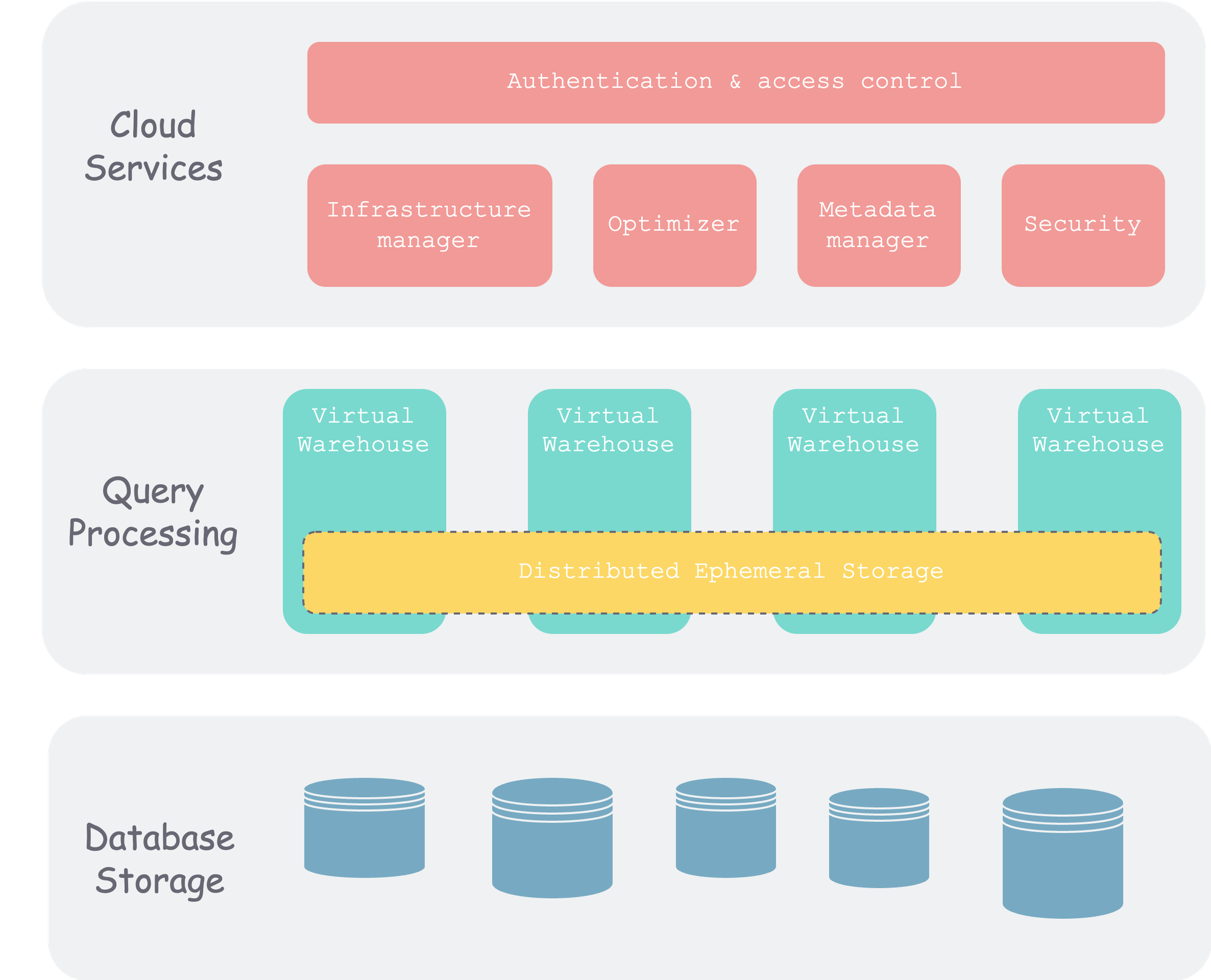 snow-architecture.png
As you can see, Snowflake is divided into three layers overall. In addition to the commonly mentioned storage and compute layers, there is also a metadata layer.
This is also a classic division in distributed data systems. In this video, I also organized some threads of distributed systems according to this classification method. Interested readers can go check it out.
Database Storage Layer
This layer is the final persistence layer for data. At the beginning (when the paper was published), it was usually stored on object storage of various cloud vendors. Later, it also began to support third-party storage, such as Apache Iceberg.
After data is written into Snowflake, Snowflake organizes the data in the form of micro-partitions and writes it to object storage. We will talk about how to optimize, compress, determine size, and manage metadata shortly.
Query Processing Layer
That is, the compute layer. Snowflake uses Virtual Warehouses (VM) to organize compute units. Each VM contains a set of compute nodes and can come in different sizes. Different VMs are isolated from each other and do not affect one another.
There is a very important cache layer in the query processing layer. This layer is usually VM-scoped and organized by consistent hashing (to avoid data shuffle after node additions or deletions) to cache data fetched from object storage and intermediate results of operator computation.
Cloud Services
This layer is the “brain” of the entire Snowflake cluster, consisting of a set of compute instances running in the cloud. It includes the following components:
- Authentication: Multi-tenant.
- Infrastructure Management: That is, physical information management within the cluster.
- Metadata Management: Mainly the management of schema information such as databases and tables.
- Query Parsing and Optimization: From SQL parsing to execution, all stages except the final execution are here, after all, because there is global metadata here, which facilitates optimization.
- Access Control
Next, let’s focus on the storage layer and the compute layer.
Storage Layer
The cheapest and most fault-tolerant option on the cloud is undoubtedly object storage. Cloud-based systems that have large-scale data storage needs generally use object storage. Object storage is also known as blob storage (no matter what you store, it treats everything as an opaque binary block), logically organized in two levels: bucket (that is, namespace) and object. Each object is a path → object KV pair, which is flat and does not have a directory tree structure like a file system.
For Snowflake’s storage system, the characteristics of object storage that need to be considered are:
- Self-fault-tolerant: Therefore, no replication is needed at the upper layer.
- Immutable: Therefore, in-place updates cannot be performed.
Object storage itself is fault-tolerant, so Snowflake does not need to worry about availability issues, unlike the traditional share-nothing TiDB architecture where you have to manage multiple replicas across machines yourself and then use Raft to maintain consistency.
Micro-partition
Between tables and actual storage, databases usually organize data by blocks (also called partitions). The blocks of traditional data warehouses are mostly static. Snowflake calls each block of data a micro-partition, which has the following characteristics:
- Not too large: Ranging from tens of megabytes to hundreds of megabytes, facilitating splitting, merging, and migration, that is, dynamic partitioning.
- Columnar storage: Each micro-partition contains some rows, but internally, for the sake of compression and data warehouse scenarios, it is stored by column.
- Metadata: Min-max and other metadata for each column are preserved for fast filtering.
A rough schematic is as follows. On the left is a logical table, and on the right is the physical data organization. A table is “horizontally sliced” into multiple micro-partitions, and each micro-partition is “vertically sliced” and stored by column.
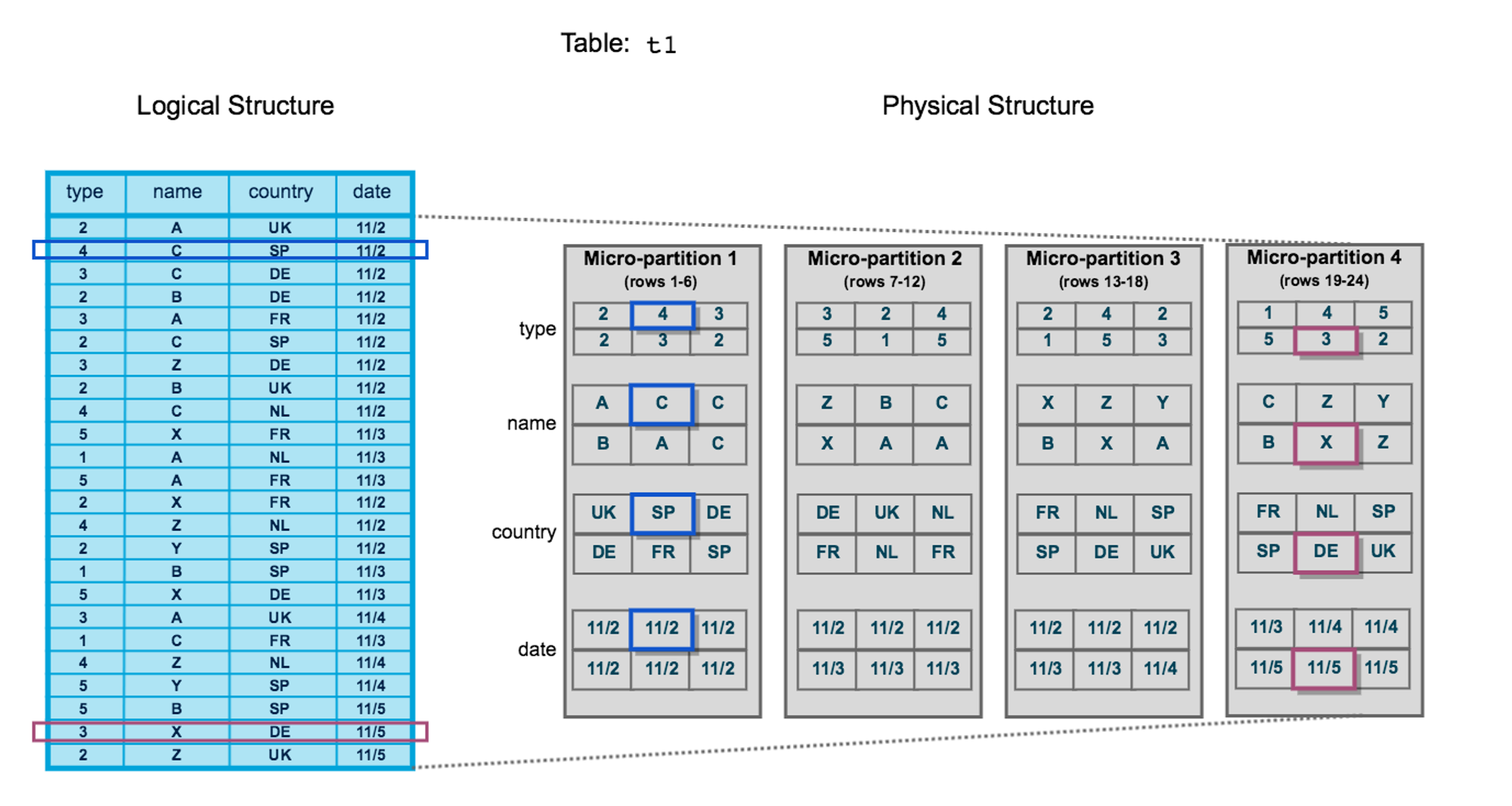 snowflake-storage-layout.png
Each micro-partition is stored as an object in object storage.
DML Operations
Since each micro-partition is immutable, what should we do when inserting, updating, and deleting row data into a table?
Insert: Insertion is the simplest — just generate new micro-partitions for the newly inserted data.
Update: First find the micro-partition corresponding to the row being updated, read it into the VM, modify it, and then write it back to object storage as a whole. Here, to distinguish between old and new micro-partitions, a version number is associated with each micro-partition file.
Delete: Similar to update — read → delete → write back, and the version number also needs to be updated during this process.
Based on each file’s version number, Snowflake can perform MVCC concurrency control, further providing SI-level isolation and time travel functionality.
Overall, every write transaction will bump the system’s version number and circle out a set of files, constituting a snapshot under the current version number. Based on these snapshots, we can access snapshots at any point in time, that is, time travel.
Compute Layer
The compute layer is the query execution layer (the previous parsing and optimization are all done in the cloud services layer). Snowflake introduces the concept of VM (Virtual Warehouse). Let’s sort out the relationships between several concepts below:
- User: Each user can start multiple VMs. For example, some VMs are used for ETL, and some VMs are used for queries.
- VM: Each VM can come in different sizes from XS to XXL, representing different amounts and sizes of compute resources. VMs are completely isolated from each other.
- Node: Compute nodes in the cloud, which contain a certain amount of memory and external storage (HDD or SSD).
When designing the execution layer, an important point is whether MPP is supported. It can be roughly understood as whether a query statement can be executed distributedly across multiple nodes like Spark, or whether it can only be executed on a single node. The latter is simpler to implement but has limited throughput. Data warehouses are usually big-data scenarios, so the former is more commonly used, but the implementation is more complex because it involves multi-machine communication during execution for data shuffle (you can refer to shuffle in Spark).
Returning to Snowflake, that is, whether a query statement can be executed on multiple nodes in a VM. From the clues in the papers, the answer should be yes.
In addition, Snowflake’s compute engine has the following main characteristics:
- Columnar: Since data warehouse scenarios usually involve “wide tables with narrow queries,” using a columnar execution engine is more efficient, and it can fully utilize single-machine caching and SIMD instructions to accelerate computation.
- Vectorized: This feels slightly confused with columnar, mainly expressing that operators execute in a “pipeline” manner, rather than materializing the output of each operator.
- Push-based: That is, instead of using the classic pull-based volcano model, it decouples control and data, which can fully utilize the cache and is more efficient. Of course, the implementation is more complex.
Elastic Scaling
The size of each VM can be dynamically scaled according to user needs. For example, if a task is urgent, you can add more compute nodes to run it in a shorter time. Since Snowflake charges based on machine * time, for the same query: running quickly with many machines and running slowly with fewer machines cost roughly the same, but the former is undoubtedly faster, which benefits users.
Caching
The data used by the execution engine mainly consists of two parts:
- Input data: That is, the data that needs to be loaded at various leaf nodes of the execution plan, which needs to be fetched from the remote side (object storage).
- Intermediate data: The execution plan is a DAG composed of operators. Each operator reads data, performs a “transformation,” and produces output for the next operator to use.
Both types of data have the possibility of being reused, especially input data. That is, after a micro-partition of a certain table is accessed, it is very likely to be accessed again within a subsequent period of time (locality principle). Therefore, it can be cached in the memory or external storage (HDD, SSD) of VM nodes. Single-machine capacity is limited, so Snowflake will pool all internal and external storage of nodes within a VM as a cache pool, and use the consistent hashing algorithm (you can refer to this article) to maintain the cache, and it is lazy consistent hashing, which can avoid frequent data migration when there are node changes in the VM.
References
- The Snowflake Elastic Data Warehouse
- Building An Elastic Query Engine on Disaggregated Storage
- Snowflake Official Documentation
- The Impact of DML Operations with micro-partitions in Snowflake