boltdb is one of the few pure-Go, single-node KV libraries on the market. boltdb is based on Howard Chu’s LMDB project, with a clean and concise implementation. Excluding unit tests and adapter code, the core code is only about four thousand lines. Simple APIs and a minimalist implementation are exactly what the author intended. Due to the author’s limited bandwidth, the original boltdb has been archived and is no longer updated. If you want to make improvements or submit new PRs, the fork maintained by etcd, bbolt, is recommended.
For convenience, this series of guide articles will still use the original, no-longer-changing repo as the basis. Though small, the project is fully featured: in just over four thousand lines of code, it implements a single-node KV engine based on B+ tree indexing with single-writer, multi-reader transaction support. The code itself is plain and well-commented. If you are a Go enthusiast or interested in KV stores, boltdb is absolutely a repo you should not miss.
This series is planned as three articles, analyzing boltdb’s source code around data organization, index design, and transaction implementation. Since these three aspects are not completely orthogonal, the narrative will inevitably intertwine; if something is unclear, just skip it for now and come back to sort it out once you have the full picture. This article is the first one: boltdb data organization.
Introduction
The bottom-most layer of a storage engine is how it organizes data on various physical media (e.g., on disk, in memory). These data organization choices also reflect the design trade-off philosophy of the storage engine.
At the file-system level, boltdb adopts a page-based organization, aligning everything to pages; in memory, boltdb organizes data as a B+ tree, whose basic unit is the node. An in-memory tree node corresponds to one or more contiguous pages on the file system. These are the only two core abstractions in boltdb’s data organization, making the design remarkably simple. Of course, such simplicity necessarily comes with a cost, which will be analyzed in detail in later articles.
This article first gives an overall explanation of the relationship between nodes and pages, then analyzes the formats of the four page types and their in-memory representations one by one, and finally walks through the DB file growth process and the memory loading strategy across the DB lifecycle.
Author: 木鸟杂记 https://www.qtmuniao.com/2020/11/29/bolt-data-organised, please indicate the source when reposting
Overview
This article mainly involves the two source files page.go and freelist.go, analyzing the on-disk formats of various boltdb pages and their representations after being loaded into memory.
Top-Level Organization
Boltdb’s data organization, from top to bottom, is as follows:
- Each DB corresponds to one file.
- Logically:
- A DB contains multiple buckets, equivalent to multiple namespaces; buckets can be nested without limit.
- Each bucket corresponds to one B+ tree.
- Physically:
- A DB file is stored sequentially in page-sized units.
- A page size is consistent with the OS page size (usually 4 KB).
Pages and Nodes
Pages are divided into four types:
- Meta pages: globally there are exactly two meta pages, saved in the file; they are the key to boltdb’s transaction implementation.
- Free-list pages: a special kind of page that stores the list of free page IDs; they appear as contiguous runs of pages in the file.
- Two data page types: all remaining pages are data pages, of two types corresponding to branch nodes and leaf nodes in the B+ tree.
The relationship between pages and nodes is:
- A page is the basic storage unit of the DB file; a node is the basic building block of the B+ tree.
- One data node corresponds to one or more contiguous data pages.
- A contiguous sequence of data pages, when deserialized and loaded into memory, becomes one data node.
To summarize: data pages organized linearly on the file system are logically structured into a two-dimensional B+ tree through in-page pointers. The tree root is saved in the meta page, while the IDs of all other unused pages are saved in the free-list page.
Page Format and In-Memory Representation
Boltdb has four page types: meta page, free-list page, branch node page, and leaf node page. They are marked with constant enumerations:
1 | const ( |
Each page consists of a fixed-length header and a data part:
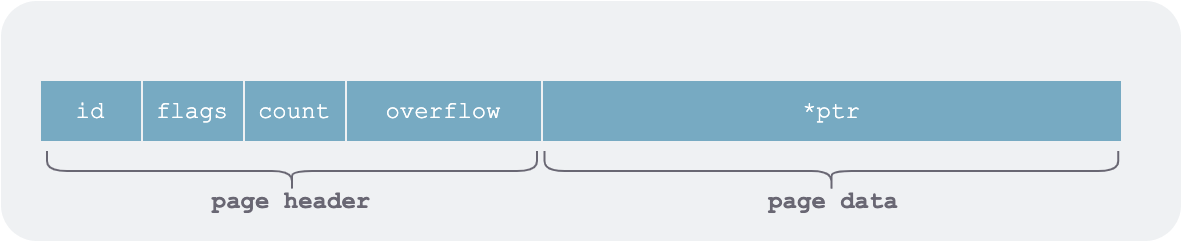 boltdb page structure
Here ptr points to the data part of the page. To avoid serialization and deserialization when loading into memory and writing to the file system, boltdb makes extensive use of pointer operations from Go’s unsafe package.
1 | type pgid uint64 |
Meta Page (metaPage)
Boltdb has exactly two meta pages, stored at the beginning of the DB file (pageid = 0 and 1). However, in the meta page ptr does not point to an element list but to the individual fields of the whole DB’s meta information.
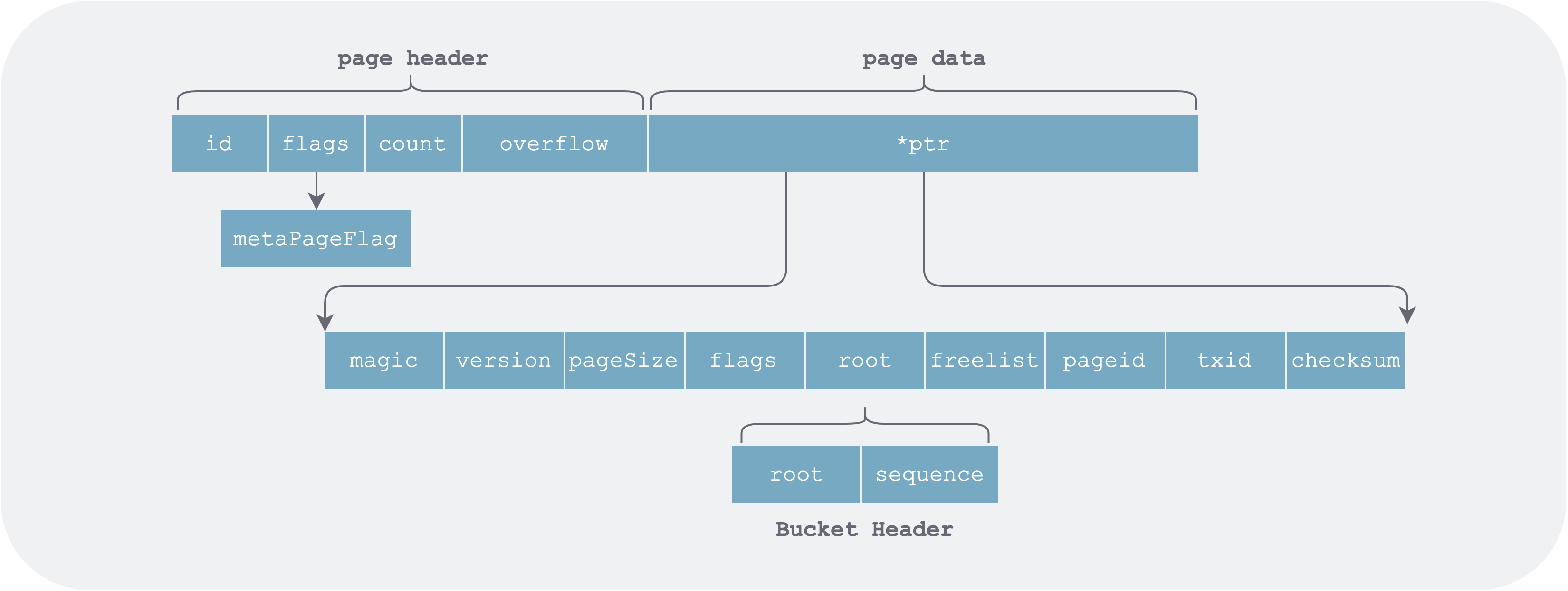 meta-page.png
The in-memory data structure after loading the meta page is as follows:
1 | type meta struct { |
Free-List Page (freelistPage)
The free-list page is a contiguous run of pages (one or more) in the DB file used to store the list of page IDs freed during DB modifications.
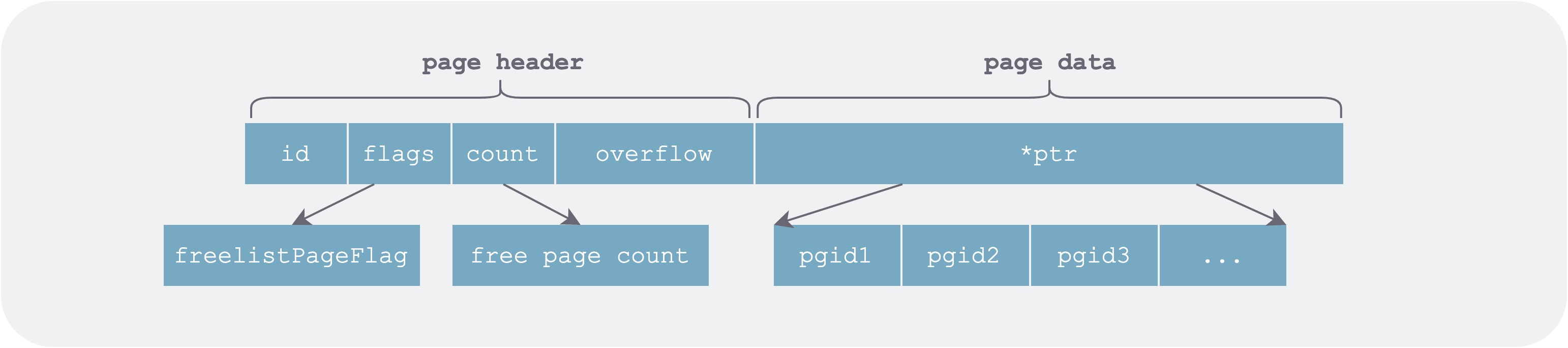 freelist-page.png
In memory it is represented in two parts: one is the list of allocatable free page IDs (ids), and the other is the list of newly freed pages grouped by transaction ID.
1 | // represents the list of currently released pages |
The pending part is recorded separately mainly for MVCC transactions:
- When a write transaction rolls back, the pending free pages of the corresponding transaction must be removed from the
pendingentry. - When a write transaction (e.g., txid=7) has already committed, some read transactions (e.g., txid <= 7) may still be using the pages it just freed, so they cannot be allocated immediately.
This part will be explained in detail in the boltdb transaction article; for now, just keep it in mind.
Converting Free List to Page
The free list persists itself to a given page via the write function at transaction commit time. When writing, it merges pending and ids before writing, because:
- The
writefunction is called at write-transaction commit time. Write transactions are serialized, so the write transactions corresponding topendinghave already committed. - Writing to the file is for crash recovery, and upon restart there are no read operations, so there is no need to worry about read transactions still using freshly freed pages.
1 | func (f *freelist) write(p *page) error { |
Note that this step only converts freelist into an in-memory page structure; additional operations such as tx.write() are required to actually persist the corresponding pages to the file.
Loading Free List from Page
When the database restarts, it first recovers a valid meta information from the first two meta pages. Then, according to the freelist field in the meta information, it finds the starting address of the freelist pages and restores it into memory.
1 | func (f *freelist) read(p *page) { |
Free-List Allocation
The original author’s free-list allocation is exceptionally simple. The allocation unit is the page, and the allocation strategy is first-fit: from the sorted free page list ids, find the first run of contiguous free pages equal to the requested length, then return the starting page ID.
1 | // if n contiguous free pages can be found, return the starting page id |
This GC strategy is quite simple and direct, with linear time complexity. Alibaba seems to have made a patch that groups all free pages by their contiguous length.
Leaf Page (leafPage)
This type of page corresponds to a leaf node in the B+ tree. A leaf node contains two kinds of elements: ordinary KV data and sub-buckets.
For the former, the basic element stored in the page is a piece of user data in some bucket. For the latter, an element in the page is a sub-bucket in the DB.
1 | // single element in the byte array pointed to by page ptr |
Its detailed structure is as follows:
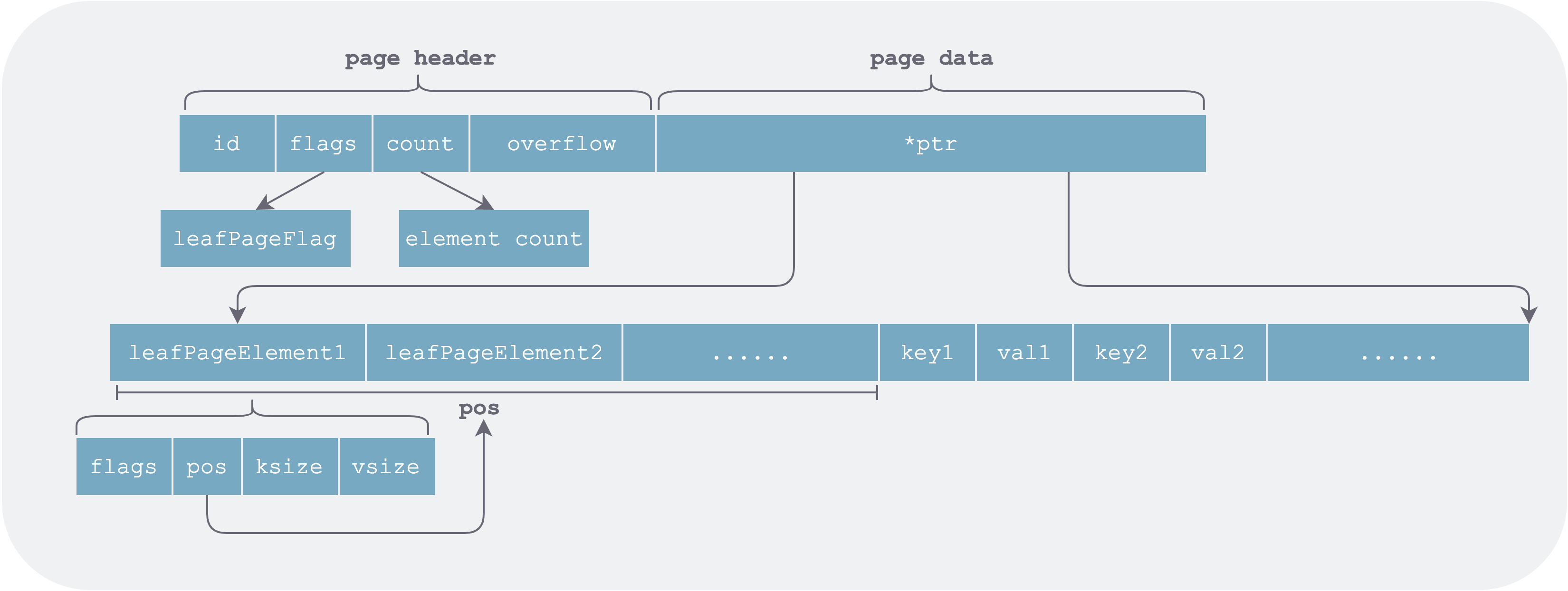 leaf-page-element.png
As can be seen, when organizing data, the leaf page stores element headers (leafPageElement) and the elements themselves (key value) separately. The advantage is that leafPageElement is fixed-length and can be accessed by index. During binary search for a given key, only the corresponding page needs to be loaded into memory on demand (pages are accessed via mmap, so data is actually loaded from the file system into memory only when accessed).
1 | inodes := p.leafPageElements() |
If element headers and their corresponding elements were stored adjacent to each other, all pages corresponding to the leafPageElement array would have to be read sequentially and fully loaded into memory before binary search could be performed.
Another small optimization is that pos stores the relative offset from the start address of the element header to the start address of the element, rather than the absolute offset from the ptr pointer. This allows a relatively small number of bits (pos is uint16) to represent a relatively long distance.
1 | func (n *branchPageElement) key() []byte { |
Branch Page (branchPage)
The branch page structure is largely the same as the leaf page. The difference is that the value saved in the page is a page ID, i.e., the page that each branch of this branch node at certain keys points to.
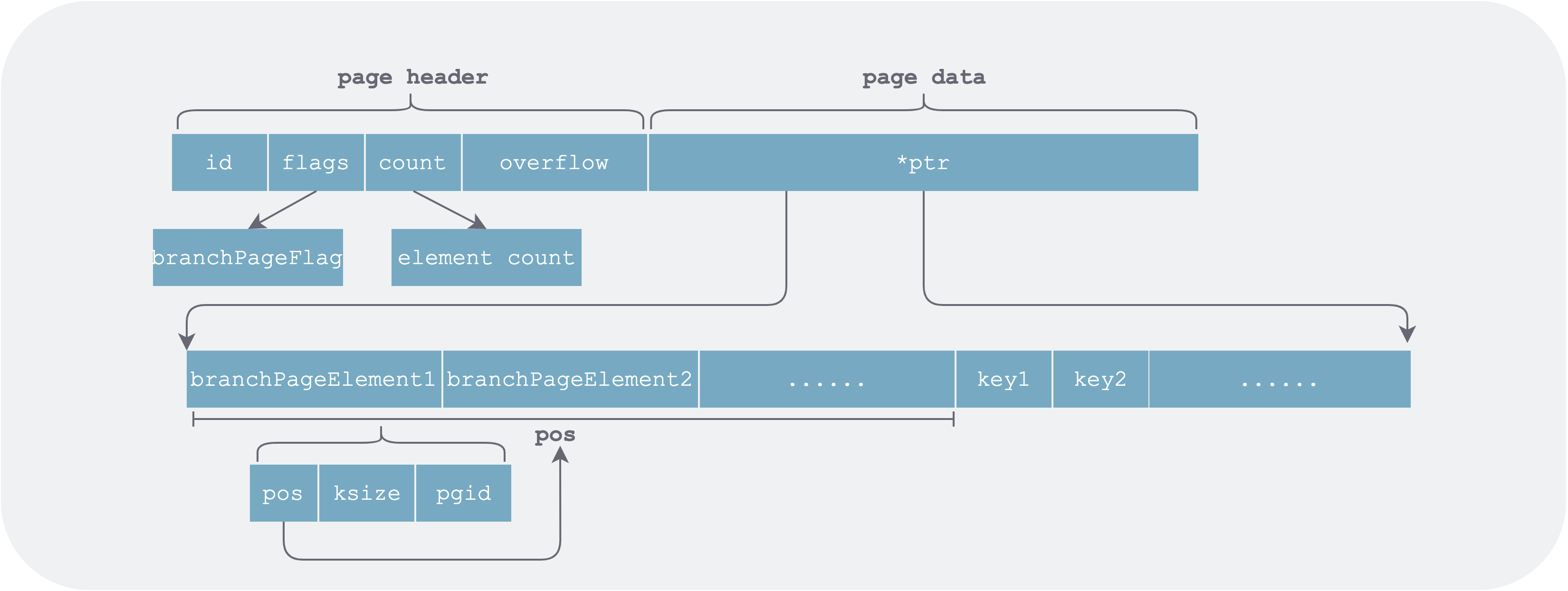 branch-element.png
The key in branchPageElement stores the starting key of the page it points to.
Conversion Flow
Boltdb uses mmap to map the DB file into memory space. While building the tree and accessing it, corresponding pages are loaded into memory on demand, leveraging the OS page cache policy for replacement.
File Growth
When we open a DB, if the DB file is found to be empty, four pages are initialized in memory (4 * 4K = 16K): two meta pages, one empty free-list page, and one empty leaf node page. They are then written to the DB file, after which the normal open flow proceeds.
1 | func (db *DB) init() error { |
As data is continuously written, new pages need to be allocated. Boltdb first looks in the freelist for any reusable pages; if none are available, it must re-mmap (unmap then mmap) to expand the DB file. Each expansion doubles the size (so starting from 16K * 2 = 32K), and after reaching 1 GB, each subsequent expansion adds another 1 GB.
1 | func (db *DB) mmapSize(size int) (int, error) { |
On 32-bit machines the file must not exceed maxMapSize = 2 GB; on 64-bit machines the upper limit is 256 TB.
Read/Write Flow
When opening an existing DB, the DB file is first mapped into memory space, then the meta pages are parsed, and finally the free list is loaded.
When reading from the DB, pages along the access path are loaded into memory on demand and converted to nodes for caching.
When modifying the DB, the COW principle is used: all modifications are not done in place, but a copy is made before any change. If a leaf node needs to be modified, all nodes on the path from the root bucket to that node must also be modified. These nodes all need newly allocated space and then persistence; this is closely related to transaction implementation and will be explained in detail in the transaction article of this series.
Summary
Boltdb uses only two concepts in data organization: page and node. Each database corresponds to one file, and each file contains a series of linearly organized pages. Page sizes are fixed; depending on their nature, there are four types: meta page, free-list page, leaf page, and branch page. When opening the database, the following operations are performed in sequence:
- Use mmap to map the database file into memory space.
- Parse the meta pages to obtain the free-list page ID and the root bucket page ID.
- According to the free-list page ID, load all free pages into memory.
- According to the root bucket starting page address, parse the root bucket root node.
- According to read/write needs, starting from the tree root, traverse and load data pages (branch pages and leaf pages) along the access path into memory on demand to become nodes.
As can be seen, nodes are of two types: branch node (branch node) and leaf node (leaf node).
Another thing to note is that the existence of nested buckets makes this part slightly harder to understand. In the next article on boltdb’s index design, we will analyze in detail how boltdb organizes multiple buckets and the B+ tree index within a single bucket.
References
- github, boltdb repo
- 我叫尤加利, boltdb 源码分析