DDIA reading group: we will share chapter by chapter, supplemented with some details based on my experience in distributed storage and databases in industry. Sharing roughly every two weeks—welcome to join. Schedule and all transcripts are here. We have a corresponding distributed systems & database discussion group; notifications will be sent before each session. To join, add my WeChat: qtmuniao, briefly introduce yourself, and note: Distributed Systems Group.
Chapter 1 is easily skipped because it is concept-heavy and tends to speak in generalities. Yet the three concepts it introduces are indeed unavoidable focal points when building systems.
P.S. The open-source Chinese translation is not very idiomatic in places, which can make for uncomfortable reading—though this is unavoidable in any translation.
Author: Muniao’s Notes https://www.qtmuniao.com/2022/02/19/ddia-reading-chapter1 — please indicate the source when reposting
Why This Book Takes Data Systems as Its Theme
Data system is a vague umbrella term. In the information society, everything can be informatized—or, to some extent, digitized. The collection, storage, and use of this data form the foundation of the information society. Most common applications are backed by a data system, e.g., WeChat, JD.com, Weibo, etc.
 data-society.png
Therefore, as IT practitioners, it is necessary to systematically understand modern, distributed data systems. By studying this book, we can learn the principles behind data systems, understand common practices, and apply them to the systems we design at work.
Common Data Systems
- Storing data for later reuse — database
- Remembering the results of very “heavy” operations to speed up subsequent reads — cache
- Allowing users to search by various keywords and filter data by various conditions — search engine
- Continuously generating data and sending it to other processes for handling — stream processing
- Periodically processing accumulated large volumes of data — batch processing
- Transmitting and distributing messages — message queue
These concepts are so familiar that we use them directly when designing systems without thinking about their implementation details, let alone reimplementing them from scratch. Of course, this also shows how successful these abstractions are.
Increasing Complexity of Data Systems
In recent years, however, as application requirements have grown more complex, many new data collection, storage, and processing systems have emerged. They are not confined to a single function, and are difficult to rigidly classify into any one category. A few examples:
- Kafka: can persist log data for a period of time; can act as a message queue to distribute data; can act as a stream-processing component to repeatedly refine data; and so on.
- Spark: can perform batch processing on data; can also turn small batches into streams for stream processing.
- Redis: can serve as a cache to accelerate database access; can also act as an event hub for pub-sub messaging.
When we face a new scenario and combine these components in some way, we are, in a sense, creating a new data system. The book gives a common example of a data system that collects, stores, queries, and side-processes user data. From its diagram you can see shadows of various Web Services.
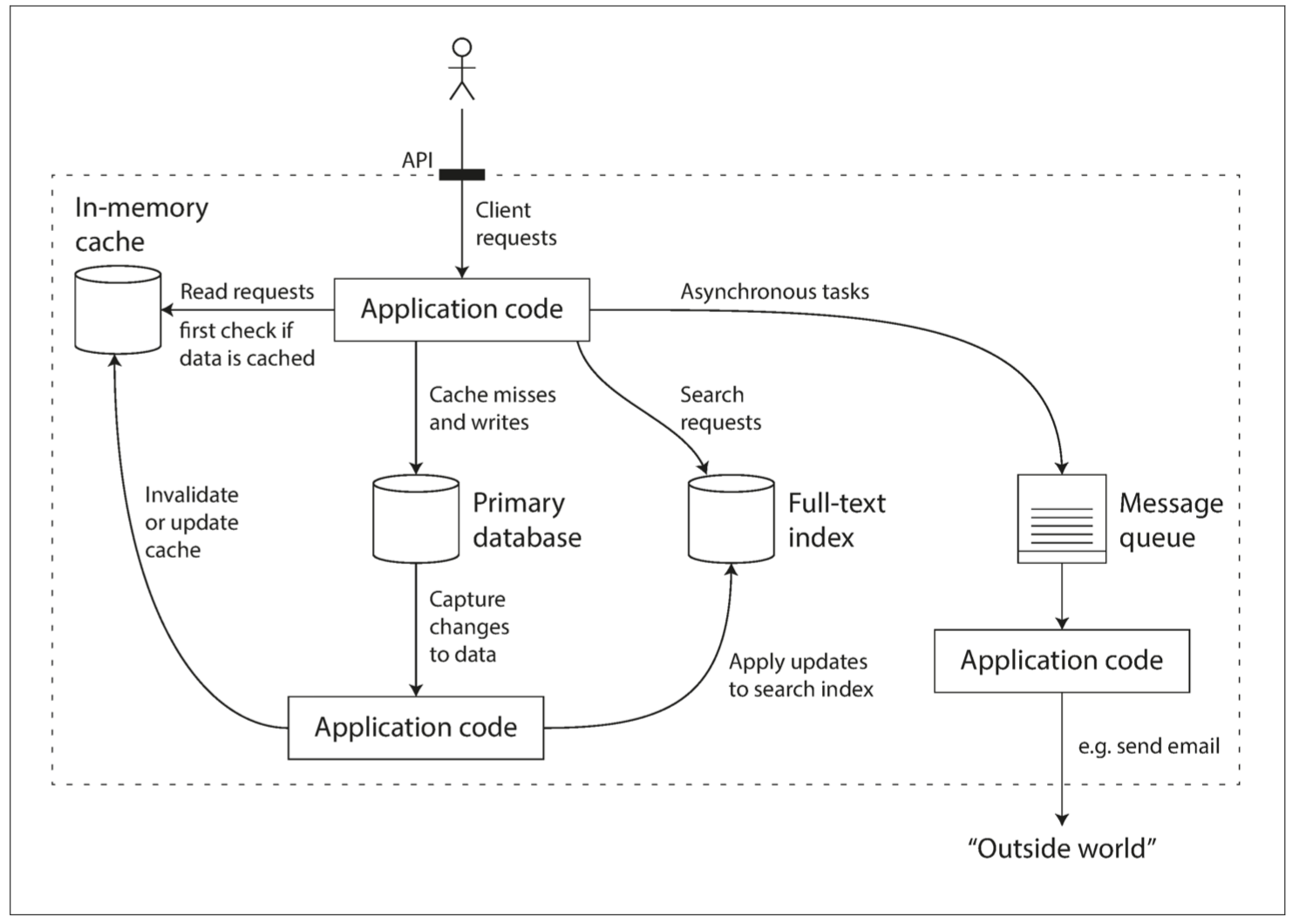 data-system.png
Yet even such a small system involves many trade-offs in design:
- Which caching strategy to use? Cache-aside or write-through?
- When some component machines fail, do we guarantee availability or consistency?
- When a machine is temporarily unrecoverable, how do we ensure data correctness and completeness?
- When load increases, do we add machines or improve single-machine performance?
- When designing external APIs, do we aim for simplicity or pursue power?
Therefore, it is necessary to think fundamentally about how to evaluate a good data system, how to build a good data system, what design patterns can be followed, and what aspects usually need to be considered.
The book answers with three words: Reliability, Scalability, Maintainability
Reliability
How is reliability measured?
-
Functionally
- Under normal circumstances, application behavior satisfies the behavior specified by the API.
- When users enter incorrect input or perform incorrect operations, it can handle them properly.
-
Performance-wise
Under given hardware and data volumes, promised performance metrics are met.
-
Security-wise
It can block unauthorized access and malicious damage.
Availability is also an aspect of reliability; cloud services usually measure availability in terms of “nines.”
Two easily confused concepts: Fault (something goes wrong in the system) and Failure (the system cannot provide service).
A system that cannot tolerate faults will easily fail after accumulating many faults.
How to prevent it? Chaos testing: e.g., Netflix’s chaosmonkey.
Hardware Failures
In a large data center, this is the norm:
- Network jitter or disconnection
- Hard-drive aging and bad sectors
- Memory failures
- Machine overheating causing CPU problems
- Data-center power outages
Common hardware metrics that need to be considered in data systems:
-
MTTF (mean time to failure)
A single disk has an average failure time of 5–10 years. If you have 10k+ disks, under uniform expectation you would expect failed disks every day. Of course, in reality hard drives fail in waves.
Solutions: increase redundancy:
Multi-path power supply to the data center, dual networks, etc.
For data:
Single machine: can use RAID redundancy, e.g., EC erasure coding.
Multi-machine: multiple replicas or EC erasure coding.
Software Errors
Compared to the randomness of hardware failures, software errors have higher correlation:
- Inability to handle specific input, causing system crashes.
- Runaway processes (e.g., loops that do not release resources) exhausting CPU, memory, and network resources.
- System-dependent components becoming slow or even unresponsive.
- Cascading failures.
When designing software, we usually have some environmental assumptions and some implicit constraints. As time passes and the system continues to run, if these assumptions can no longer be satisfied, or if these constraints are broken by later maintainers adding features, a system that was running normally at first may suddenly crash.
Human Errors
The most unstable element in a system is people, so the design should eliminate human impact on the system as much as possible. According to the software lifecycle, consider it in several stages:
-
Design & Coding
- Eliminate all unnecessary assumptions as much as possible, provide reasonable abstractions, and carefully design APIs.
- Isolate between processes, and use sandbox mechanisms for modules that are especially error-prone.
- Design circuit breakers for service dependencies.
-
Testing Phase
- Introduce third-party testers as much as possible, and automate the testing platform as much as possible.
- Unit testing, integration testing, e2e testing, chaos testing.
-
Operation Phase
- Detailed dashboards.
- Continuous self-checks.
- Alerting mechanisms.
- Problem playbooks.
-
For the Organization
Scientific training and management.
How Important Is Reliability?
It concerns user data security, corporate reputation, and is the cornerstone of a company’s survival and growth.
Scalability
Scalability is the ability of a system to cope with load growth. It is important, yet difficult to get right in practice, because a fundamental contradiction exists: only products that survive are qualified to talk about scalability, while designing for scalability too early often leads to death.
Still, one can learn some basic concepts to deal with potentially explosive load growth.
Measuring Load
Before dealing with load, you must first find a suitable way to measure it, such as load parameters:
- Daily/monthly active users of the application
- Requests per second to the Web server
- Read/write ratio in the database
- Number of simultaneously active users in a chat room
The book uses information disclosed by Twitter in November 2012 as an example:
- Identify core businesses: posting tweets, home feed timeline.
- Determine request magnitudes: posting tweets (average 4.6k req/s, peak over 12k req/s), viewing others’ tweets (300k req/s).
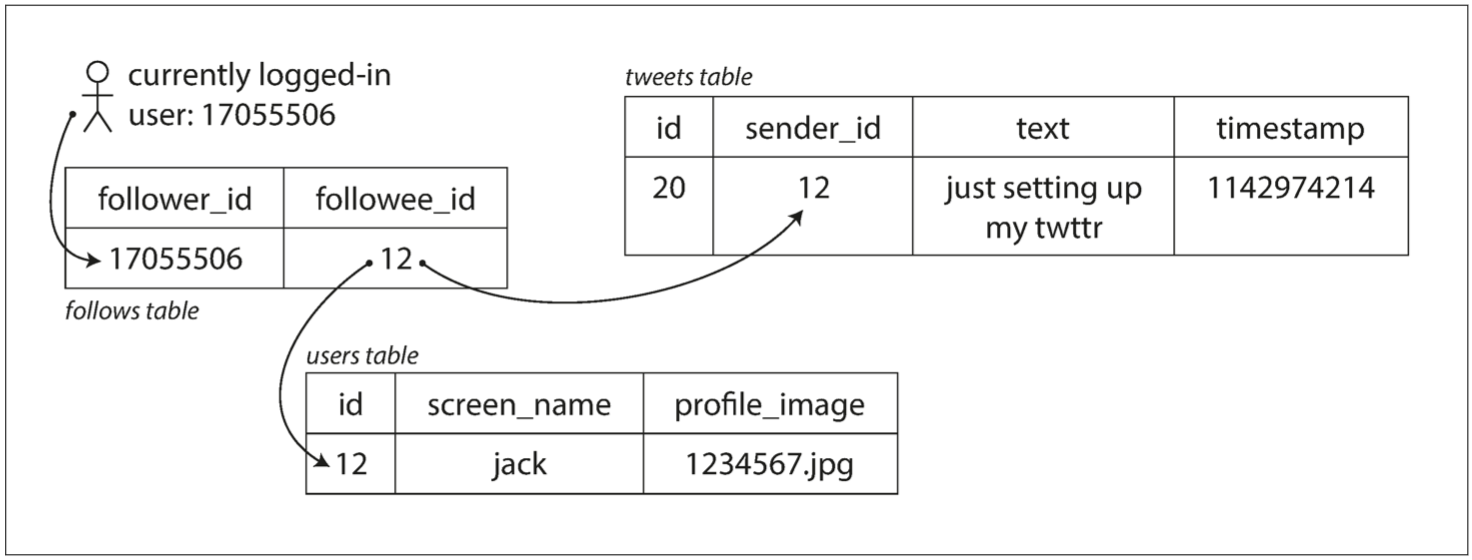 twitter-table.png
In terms of data magnitude alone, the design does not matter much. But Twitter needs to process data multiple times based on follow and followed relationships between users. There are two common approaches: pull and push:
- Pull. When each user views their home feed, pull all followed users’ tweets from the database in real time, merge them, and present them.
- Push. Save a feed-timeline view for each user; when a user posts a tweet, insert it into all followers’ feed-timeline views.
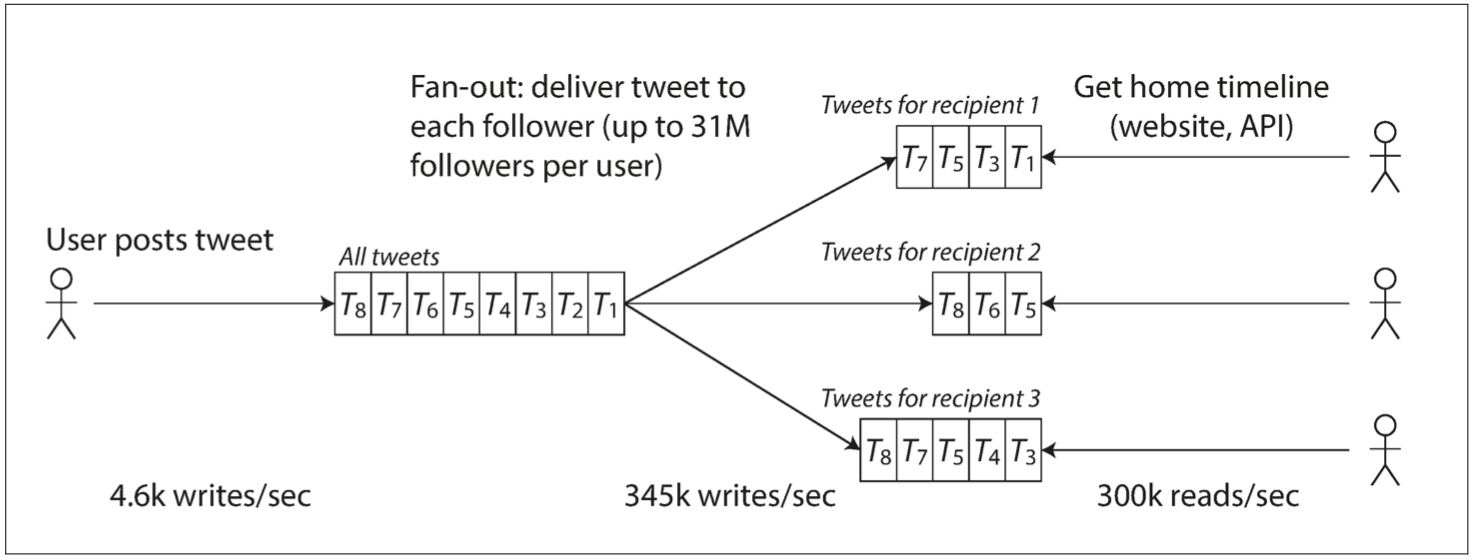 twitter-push.png
The former is lazy: users only pull when they view, so there is no invalid computation or requests, but it needs to be calculated on the fly each time, making presentation slower. It also cannot withstand high traffic.
The latter pre-computes the view regardless of whether the user views it or not, making presentation faster, but introduces many invalid requests.
Ultimately, a hybrid push-pull approach is used, which is also a classic system-design interview question abroad.
Describing Performance
Note the distinction from system load: system load is examining the system from the user’s perspective, an objective metric. System performance describes an actual capability of the system. For example:
- Throughput: the amount of data that can be processed per second, usually denoted as QPS.
- Response time: the time observed from the user side from sending a request to receiving a response.
- Latency: In daily usage, latency is often used interchangeably with response time; but strictly speaking, latency only refers to the queuing and dormancy time during the request process. Although it generally accounts for the bulk of response time, only when we consider the actual processing time of the request to be instantaneous can latency be equivalent to response time.
Response time is usually measured by percentiles, such as p95, p99, and p999, meaning that 95%, 99%, or 99.9% of requests can be completed within that threshold. In practice, sliding windows are usually used to calculate the response-time distribution over a recent period, and it is usually presented as line charts or histograms.
Coping with Load
After having the means to describe and define load and performance, we finally come to the main topic: how to cope with continuous load growth, i.e., making the system scalable.
- Scaling up or vertical scaling: switch to machines with more powerful performance. e.g., mainframes for machine-learning training.
- Scaling out or horizontal scaling: “parallel” many cheap machines to share the load. e.g., Musk building rockets.
Two ways of load scaling:
-
Automatic
If the load is hard to predict and volatile, automatic is better. The downside is that it is not easy to track load, prone to jitter, and causes resource waste.
-
Manual
If the load is easy to predict and does not change much, manual is best. Simple to design and less prone to errors.
For different application scenarios:
First, if the scale is small, try to use machines with better performance, which can save a lot of trouble.
Second, you can use the cloud and leverage cloud scalability. Even infrastructure providers such as Snowflake are all-in on cloud-native.
Finally, if that still does not work, then consider designing your own scalable distributed architecture.
Two service types:
-
Stateless services
Relatively simple: multiple machines with a gateway on the outside.
-
Stateful services
Depending on requirements and scenarios—read/write load, storage magnitude, data complexity, response time, access patterns—make trade-offs and design an architecture that meets the needs.
You cannot have everything; there is no silver-bullet architecture! Yet at the same time: everything changes but the essence remains the same—the atomic design patterns that make up different architectures are limited, which is also the focus of the book’s later discussions.
Maintainability
From the perspective of the entire software lifecycle, the maintenance phase definitely accounts for the bulk.
But most people like to dig holes, not fill them. Therefore, it is necessary to dig the hole well enough from the very beginning. There are three principles:
-
Operability
Easy for the operations team to take over painlessly.
-
Simplicity
Easy for new developers to get started smoothly: this requires reasonable abstraction and eliminating various complexities as much as possible. e.g., hierarchical abstraction.
-
Evolvability
Easy to quickly adapt to future requirements: avoid tight coupling, do not bind code to a specific implementation. Also called extensibility, modifiability, or plasticity.
Operability: Life Is Short, Care for Operations
Effective operations is absolutely a high-tech job:
- Closely monitor system status and quickly recover when problems occur.
- After recovery, review the problem and locate the cause.
- Regularly update and upgrade platforms, libraries, and components.
- Understand interrelationships between components to avoid cascading failures.
- Establish automated configuration management, service management, and update/upgrade mechanisms.
- Execute complex maintenance tasks, such as moving a storage system from one data center to another.
- Ensure system security when making configuration changes.
A system with good operability means writing documentation and tools to automate definable maintenance processes, thereby freeing up human resources to focus on higher-value matters:
- Friendly documentation and consistent operational standards.
- Detailed monitoring dashboards, self-checks, and alerts.
- Universal default configurations.
- Self-healing mechanisms when problems occur, and allowing administrators to manually intervene when self-healing is impossible.
- Automate maintenance processes as much as possible.
- Avoid single-point dependencies, whether machines or people.
Simplicity: Complexity Management
 recommand-book.png
Recommended book: A Philosophy of Software Design, which discusses how to define, identify, and reduce complexity in software design.
Complexity manifestations:
- Expansion of state space.
- Strong coupling between components.
- Inconsistent terminology and naming.
- Performance hacks.
- Workarounds everywhere.
The requirements are simple, but that does not stop you from implementing them in a very complex way 😉: too much accidental complexity is introduced—complexity not determined by the problem itself, but introduced by the implementation.
Usually, it is because the problem is not understood deeply enough, and “running-account” (without any abstraction) style code is written.
If you find a suitable abstraction for a problem, then half the problem is solved, e.g.:
- High-level languages hide the details of machine code, CPU, and system calls.
- SQL hides the details of storage architecture, index structures, and query-optimization implementation.
How to find suitable abstractions?
- Find them from common abstractions in the computer field.
- Find them from concepts commonly encountered in daily life.
In short, a suitable abstraction is either intuitive; or shares context with your readers.
This book will also present many abstractions commonly used in distributed systems later.
Evolvability: Lowering the Barrier to Change
If system requirements do not change, it means the industry is dead.
Otherwise, requirements are constantly changing, and the reasons for change are varied:
- A more comprehensive understanding of the problem domain.
- Emergence of previously unconsidered use cases.
- Changes in business strategy.
- Customers demanding new features.
- Changes in dependent platforms.
- Compliance requirements.
- Changes in scale.
Ways to cope:
-
Project management
Agile development.
-
System design
Builds on the first two points. Reasonable abstraction, reasonable encapsulation, closed for modification, open for extension.
References
- https://dataintensive.net/
- http://ddia.vonng.com/#/ch1